

În era digitală de azi, toți vor să facă un video, fie din motive personale, de afaceri sau pur și simplu pentru a-l posta pe rețelele sociale. Acest ghid cuprinzător îți arată, pas cu pas, cum poți crea conținut video captivant, indiferent de nivelul tău de experiență.
Două moduri de a face un video – Tradițional sau cu AI
Există două metode principale de a face un video: metoda tradițională și metoda bazată pe AI. Ambele au avantaje și dezavantaje specifice, potrivite pentru diferite tipuri de public și obiective.
Procesul tradițional de creare video
Crearea unui video pe cale tradițională presupune un anumit nivel de abilități & cunoștințe, timp, echipamente și, uneori, un buget considerabil. Iată cum arată, pe scurt:
- Timp: Un video obișnuit poate dura de la câteva ore la mai multe săptămâni, în funcție de amploarea proiectului.
- Abilități & Cunoștințe: Asta înseamnă să înțelegi unghiurile de filmare, iluminatul, scrierea scenariului, storyboard-ul și montajul video.
- Echipament: Camere (DSLR, smartphone, camcorder), trepiede, microfoane și seturi de lumini.
- Cost: Dacă folosești smartphone-ul poate fi ieftin, dar echipamentele profesionale pot costa de la sute la mii de dolari.
Procesul de creare video cu AI
Metoda bazată pe AI simplifică considerabil procesul de creare video:
- Fără curba de învățare: Instrumentele AI au adesea interfețe ușor de înțeles pentru începători.
- Direct în browser: Majoritatea editorilor video AI sunt online, nu necesită descărcare.
- Fără echipament special: Folosește orice dispozitiv cu conexiune la internet.
- Cost: De obicei mai ieftine decât metodele tradiționale, multe având și opțiuni gratuite.
- Rapid: Generatoarele video AI pot transforma textul în video în doar câteva minute.
Cum să faci un video folosind poze și videoclipuri gratuit
Platforme precum Canva și alte instrumente online de creat video oferă șabloane video personalizabile în care poți adăuga prin drag and drop imaginile și clipurile tale, pentru a realiza slideshow-uri sau conținut video scurt.
Crearea de videoclipuri pe Windows
Windows oferă o varietate de programe de editare video. Windows Movie Maker a fost o opțiune prietenoasă pentru începători și extrem de populară la vremea sa, dar Microsoft a întrerupt suportul pentru el.
Cel mai bun creator video gratuit pentru Windows
Shotcut iese în evidență ca editor video gratuit și robust pentru Windows, oferind o gamă largă de instrumente de editare, tranziții și șabloane video personalizabile.
Cum să folosești Windows Movie Maker
Deși este învechit, dacă mai ai Windows Movie Maker instalat:
- Începe prin a importa clipurile video și pozele tale.
- Trage-le pe linia de timp.
- Adaugă tranziții, texte și muzică.
- Previzualizează și salvează în formatul dorit.
Adaugă un plus de creativitate videoclipurilor tale
Ca să-ți faci videoclipurile mai captivante:
- Folosește animații și GIF-uri.
- Adaugă voice-over-uri sau muzică de fundal.
- Experimentează cu tranziții și suprapuneri.
- Inserează watermark-uri sau branding pentru un aspect profesional.
- Folosește generatoare de imagini pentru fundaluri dinamice.
Top 10 instrumente pentru a crea un video
Speechify AI Video Generator
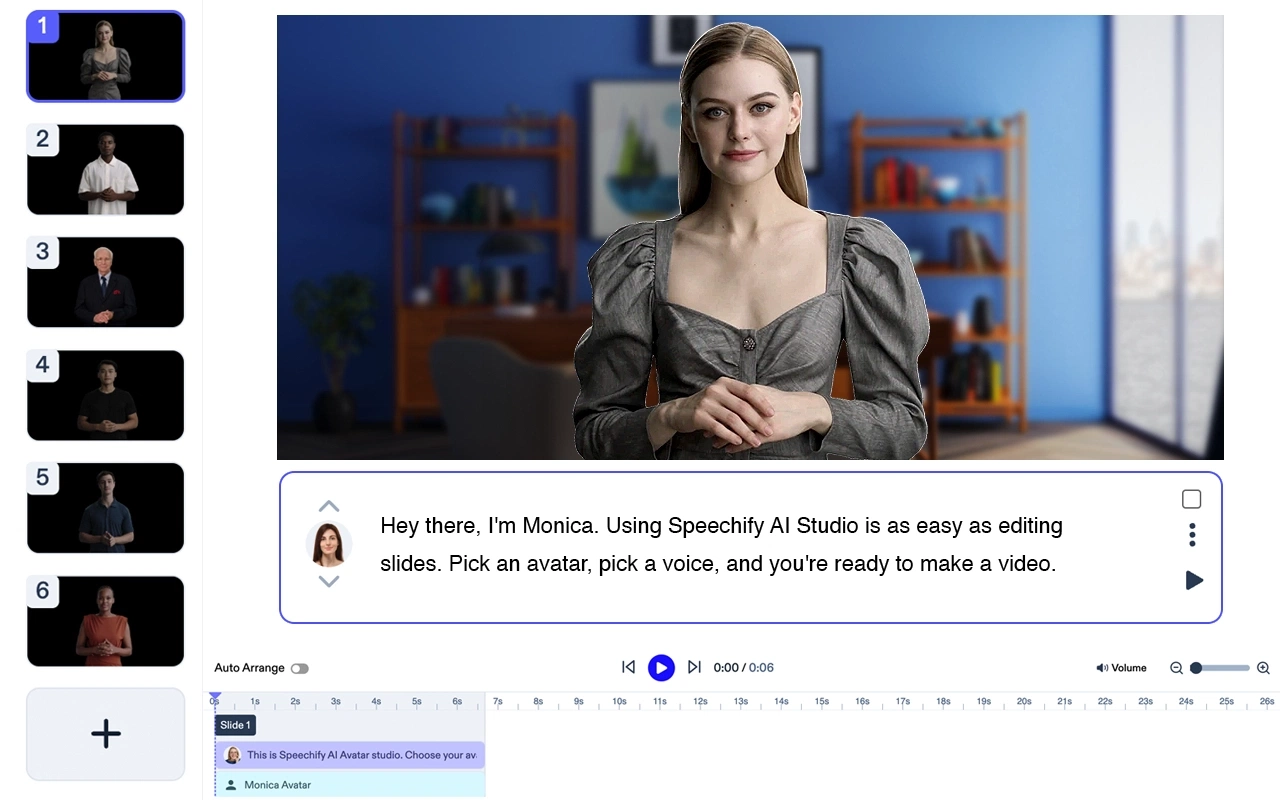
Preț: Gratuit pentru testare
Creează videoclipuri finisate fără actori sau echipamente. Transformă orice text în videoclipuri de calitate înaltă cu avataruri AI și voice-over-uri – în mai puțin de 5 minute.
Funcții Generator Avatar Speechify
- Ai nevoie doar de un laptop
- Fără personal. Poți crea un video în câteva minute
- Folosește unul sau mai mulți avataruri AI fără cost suplimentar
- Primești videoclipul tău în câteva minute
- Editare minimă sau deloc. Fără curba de învățare.
Speechify este, fără îndoială, cea mai bună opțiune AI pentru a crea un video. Deși, ca produs independent, este de top, se integrează perfect și cu suita Speechify Studio de produse AI pentru creatori. Încearcă-l chiar tu, gratuit!
Adobe Premiere Pro
Un instrument profesionist de editare video. Funcții cheie: suport multiformat, editare video cu AI, tranziții avansate, export video de calitate înaltă, corecție profesională a culorilor.
Cost: De la 20,99 $/lună.
Final Cut Pro
Exclusiv pentru macOS. Funcții de top: timeline magnetic, colorizare avansată, editare video 360°, editare multicam, suport HDR.
Cost: 299,99 $ plată unică.
iMovie
Ideal pentru începători pe macOS și iPhone. Funcții de top: șabloane gata făcute, efecte video, efect green-screen, muzică fără drepturi de autor, suport rezoluție 4K.
Cost: Gratuit. Inclus implicit pe Mac-uri.
Filmora
Ușor de folosit pentru începători. Funcții de top: texte și titluri, bibliotecă muzicală, suprapuneri & filtre, editare video avansată, interfață drag & drop.
Cost: De la 39,99 $/an.
KineMaster (Android & iPhone)

Editor video mobil. Funcții de top: previzualizare instant, editare pe mai multe straturi, controlul vitezei, filtre audio, chroma key.
Cost: De la 4,99 $/lună.
InVideo
Creator video online. Funcții de top: peste 4000 de șabloane, text către video, video AI, integrare cu rețele sociale, branding personalizabil.
Cost: De la 15 $/lună.
Camtasia

Înregistrare ecran și editare video. Funcții de top: recorder ecran, adnotări, efecte video, editor drag & drop, animații personalizabile.
Cost: De la 249 $ plată unică.
Animaker

Instrument pentru creare video animat. Funcții de top: șabloane animate, interfață drag & drop, personaje personalizabile, infografice, grafice animate.
Cost: De la 10 $/lună.
Biteable
Creator video online pentru clipuri promo și video explicative. Funcții de top: clipuri video din stoc, animații, scene personalizabile, bibliotecă muzicală, distribuire pe rețele sociale.
Cost: De la 19 $/lună.




