

Günümüz dijital çağında, herkes video yapmak istiyor; ister kişisel nedenlerle, ister iş için, ister sadece sosyal medyada paylaşmak için. Bu kapsamlı rehber, uzmanlık seviyeniz ne olursa olsun, ilgi çekici video içerikleri nasıl hazırlayabileceğinize dair derinlemesine bilgi sunuyor.
Video Yapmanın İki Yolu: Geleneksel ve Yapay Zekâ
Bir video hazırlamanın iki temel yolu vardır: geleneksel yöntem ve yapay zekâ destekli yöntem. Her ikisinin de kendine özgü artıları ve eksileri vardır; farklı kitle ve amaçlara hitap eder.
Geleneksel Video Üretim Süreci
Geleneksel yöntemle video oluşturmak belli bir düzeyde beceri & bilgi, zaman, ekipman ve bazen de hatırı sayılır bir bütçe gerektirir. İşte ayrıntılar:
- Zaman: Bir videonun hazırlanma süresi, projenin kapsamına bağlı olarak birkaç saatten haftalara kadar uzayabilir.
- Beceri & Bilgi: Çekim açıları, ışıklandırma, senaryo yazımı, storyboard hazırlama ve video montajını içerir.
- Ekipman: Kameralar (DSLR, akıllı telefon, video kamera), tripodlar, mikrofonlar ve ışık düzenekleri.
- Maliyet: Akıllı telefon kullanmak uygun maliyetli olsa da, profesyonel kurulumlar yüzlerce ila binlerce dolar arasında değişebilir.
Yapay Zekâ ile Video Üretim Süreci
Yapay zekâ destekli yöntem video oluşturma sürecini büyük ölçüde kolaylaştırır:
- Sıfıra Yakın Öğrenme Eğrisi: Yapay zekâ araçları genellikle yeni başlayanların bile rahatça kullanabileceği arayüzlerle gelir.
- Tarayıcı Üzerinden: Çoğu yapay zekâ video editörü doğrudan internet üzerinden çalışır, indirme gerektirmez.
- Özel Ekipman Gerektirmez: İnternete bağlı herhangi bir cihazla çalışabilirsiniz.
- Maliyet: Geleneksel yöntemlere göre çoğu zaman daha ekonomiktir, pek çok ücretsiz seçenek de sunar.
- Hızlı: Yapay zekâ video üreteçleri, metni birkaç dakika içinde videoya dönüştürebilir.
Resim ve Videolarla Ücretsiz Video Hazırlama
Canva gibi platformlar ve çevrim içi video yapım araçları, resim ve videolarınızı sürükleyip bırakarak slayt gösterileri veya kısa videolar hazırlayabileceğiniz, özelleştirilebilir video şablonları sunar.
Windows'ta Video Oluşturmak
Windows, pek çok video düzenleme yazılımı sunar. Windows Movie Maker yeni başlayanlar için eskiden ideal ve basit bir seçimdi ancak Microsoft artık bu aracı desteklemiyor.
Windows için En İyi Ücretsiz Video Editörü
Shotcut, geniş düzenleme araçları, geçiş efektleri ve özelleştirilebilir video şablonlarıyla Windows için öne çıkan ücretsiz bir video editörüdür.
Windows Movie Maker'ı Kullanmak
Her ne kadar eski olsa da, elinizde Windows Movie Maker varsa şunları yapabilirsiniz:
- Öncelikle video kliplerinizi ve görsellerinizi içe aktarın.
- Bunları zaman çizelgesine sürükleyip bırakın.
- Geçiş efektleri, metin bindirmeleri ve müzik ekleyin.
- Önizleyin ve istediğiniz formatta dışa aktarın.
Videolara Ekstra Yaratıcılık Katmak
Videolarınızı daha dikkat çekici ve izlemesi keyifli hale getirmek için:
- Animasyonlar ve GIF'ler kullanın.
- Seslendirme ya da arka plan müziği ekleyin.
- Geçişler ve bindirmelerle denemeler yapın.
- Daha profesyonel videolar için filigran veya marka öğeleri ekleyin.
- Dinamik arka planlar için görsel üreteçlerden yararlanın.
Video Yapmak için En İyi 10 Araç
Speechify Yapay Zekâ Video Üreteci
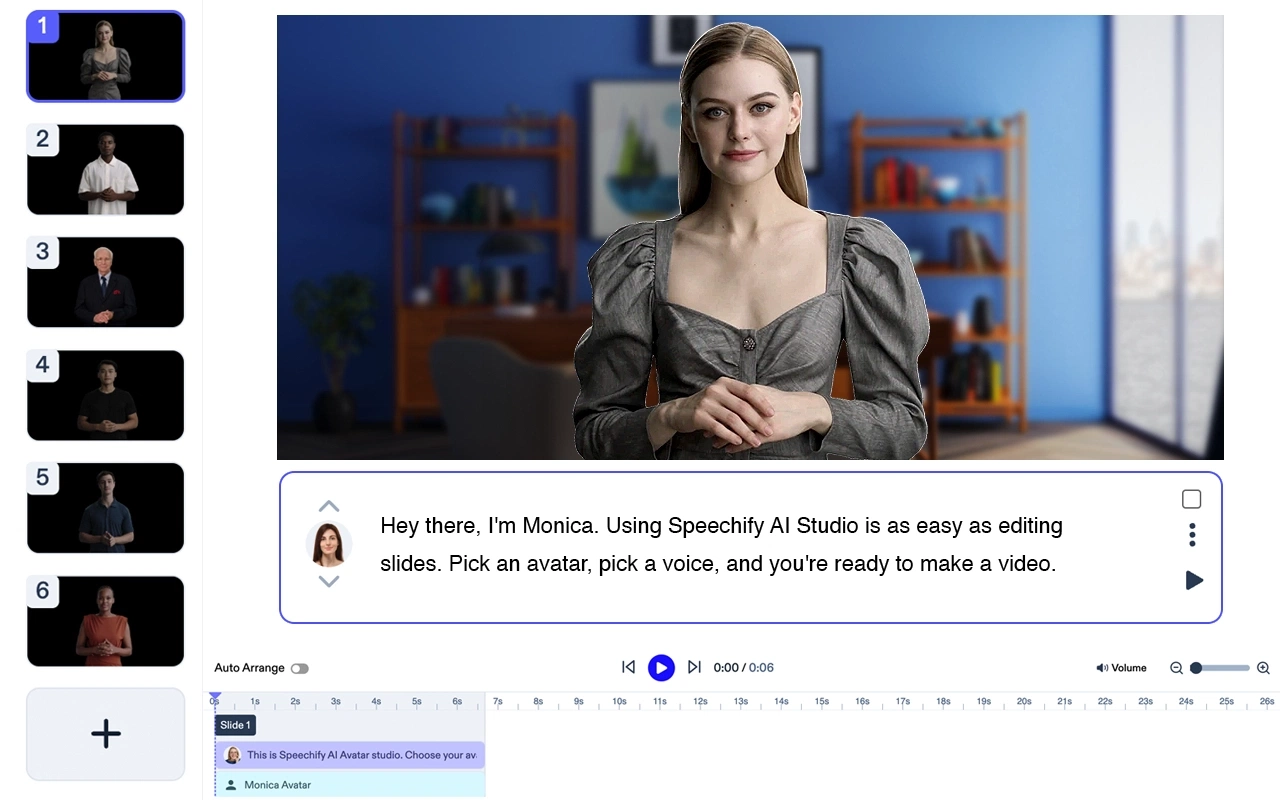
Fiyatlandırma: Ücretsiz deneme
Herhangi bir oyuncu ya da ekipmana ihtiyaç duymadan profesyonel videolar hazırlayın. Dilediğiniz metni, yapay zekâ avatarları ve seslendirmelerle, 5 dakikadan kısa sürede yüksek kaliteli videolara dönüştürün.
Speechify Avatar Üreteci Özellikleri
- Tek ihtiyacınız bir dizüstü bilgisayar
- Ekip gerekmez; dakikalar içinde video oluşturabilirsiniz
- Ekstra ücret ödemeden bir ya da birden fazla yapay zekâ avatarı kullanabilirsiniz
- Videonuz birkaç dakika içinde hazır olur
- Az ya da hiç düzenleme gerekmez; öğrenme eğrisi neredeyse sıfırdır.
Speechify, video yapmak için en güçlü yapay zekâ çözümlerinden biri olarak öne çıkıyor. Hem tek başına müthiş bir ürün, hem de yaratıcılar için Speechify Studio'nun diğer yapay zekâ araçlarıyla sorunsuz biçimde entegre oluyor. Kendiniz ücretsiz deneyin!
Adobe Premiere Pro
Profesyonel bir video düzenleme aracı. Öne çıkan özellikler: Çoklu format desteği, yapay zekâ ile video düzenleme, gelişmiş geçişler, yüksek kaliteli video çıktısı, profesyonel renk düzeltme.
Fiyat: Aylık 20,99 $'dan başlar.
Final Cut Pro
Sadece macOS için. Öne çıkan özellikler: Manyetik zaman çizelgesi, gelişmiş renk düzenleme, 360° video düzenleme, çoklu kamera montajı, HDR desteği.
Fiyat: 299,99 $ tek seferlik.
iMovie
macOS ve iPhone'da yeni başlayanlar için ideal. Öne çıkan özellikler: Hazır şablonlar, video efektleri, green-screen efekti, telifsiz müzikler, 4K çözünürlük desteği.
Fiyat: Ücretsiz. Mac'lerde varsayılan olarak yüklü gelir
Filmora
Yeni başlayanlar için kullanıcı dostu. Öne çıkan özellikler: Metin ve başlıklar, müzik kütüphanesi, bindirme & filtreler, gelişmiş video düzenleme, sürükle & bırak arayüzü.
Fiyat: Yıllık 39,99 $'dan başlar.
KineMaster (Android & iPhone)

Mobil video editörü. Öne çıkan özellikler: Anında önizleme, çok katmanlı düzenleme, hız kontrolü, ses filtreleri, chroma key.
Fiyat: Aylık 4,99 $'dan başlar.
InVideo
Çevrim içi video oluşturucu. Öne çıkan özellikler: 4000+ şablon, metinden videoya dönüştürme, yapay zekâ ile video oluşturma, sosyal medya entegrasyonu, özelleştirilebilir marka kimliği.
Fiyat: Aylık 15 $'dan başlar.
Camtasia

Ekran kaydı ve video düzenleme aracı. Öne çıkan özellikler: Ekran kaydedici, açıklamalar, video efektleri, sürükle & bırak editör, özelleştirilebilir animasyonlar.
Fiyat: Tek seferlik 249 $'dan başlar.
Animaker

Animasyonlu video oluşturma aracı. Öne çıkan özellikler: Hazır animasyon şablonları, sürükle & bırak arayüzü, özelleştirilebilir karakterler, infografikler, animasyonlu grafikler.
Fiyat: Aylık 10 $'dan başlar.
Biteable
Tanıtım ve açıklayıcı videolar için çevrim içi video yapım aracı. Öne çıkan özellikler: Stok video klipler, animasyonlar, özelleştirilebilir sahneler, müzik kütüphanesi, sosyal medya paylaşımı.
Fiyat: Aylık 19 $'dan başlar.




