

В дигиталната епоха качествените обучителни видеа се превърнаха в основен инструмент за ефективно обучение и развитие. Благодарение на напредъка на технологиите с изкуствен интелект (AI), създаването на ангажиращи и професионални обучителни видеа и уроци е по-достъпно от всякога. В тази статия ще ви преведем през процеса на създаване на обучително видео с изкуствен интелект, което ще задържи вниманието на аудиторията ви и ще предаде ценна информация. Създавайте висококачествени обучителни видеа с помощта на AI технологии, използвайки AI инструменти и видео шаблони. Подобрете своето видео съдържание с визуални материали, анимации и AI аватари, за да ангажирате обучаващите се. Възползвайте се от функции за преобразуване на текст в реч и озвучаване за професионален разказ. Улеснете създаването и редактирането на видеа с AI генератори и софтуер за монтаж. Спестете време и ресурси, като същевременно предоставяте въздействащи електронни обучителни преживявания. Персонализирайте видеата със субтитри и въвеждащо съдържание, за да отговорите на нуждите на различни групи обучаващи се. Възползвайте се от AI-генерирани видеа за рентабилно обучение. Дайте възможност на начинаещите с лесни за използване интерфейси и интуитивни видео шаблони. Включете алгоритми за машинно обучение и подходящи шрифтове, за да създадете визуално привлекателни и информативни презентации. Започнете да създавате обучителни видеа с изкуствен интелект, за да оптимизирате учебното изживяване, и изследвайте възможности в киберсигурността и отвъд нея.
Първи стъпки с видео продукция с изкуствен интелект
- Определете целите си: Започнете с изясняване на целите и задачите на вашето обучително видео. Какво искате обучаващите се да постигнат? Ясната визия ще ви помогне да структурирате съдържанието и да създадете ефективно учебно преживяване.
- Изберете правилните инструменти: Използвайте AI инструменти и платформи, създадени за видео продукция, като AI генератори на видео, инструменти за преобразуване на текст във видео и софтуер за видео редактиране. Тези инструменти предлагат множество функционалности, включително шаблони, AI аватари и анимации, които ви позволяват да създавате визуално атрактивни и ангажиращи видеа.
- Разработете сценарий: За да създадете професионално видео, планирайте съдържанието си с добре структуриран сценарий. Помислете за основните акценти, които искате да предадете, и се уверете, че сценарият съответства на вашите учебни цели. Използвайте ясен и стегнат език за по-лесно възприемане.
- Включете визуални материали: Добавете визуални елементи към вашето обучително видео, за да го направите по-ангажиращо и запомнящо се. Използвайте анимации, персонализиран аватар, графики и текстови надписи, за да подсилите ключовите концепции и да улесните разбирането. Изберете шрифтове и цветове, които съответстват на вашия бранд и засилват визуалната привлекателност на видеото.
- Добавете озвучаване и текст-в-реч: Включете професионално озвучаване или използвайте технологии за текст-в-реч, за да разкажете съдържанието на вашето видео. Гласовете с изкуствен интелект могат да осигурят естествено звучащ говор, който подобрява учебния процес.
- Редактирайте и подобрете: Използвайте софтуер за видео редакция, за да шлифовате вашето обучително видео. Изрежете ненужните сегменти, регулирайте темпото и осигурете плавно протичане на информацията. Добавете субтитри, за да отговорите на различни предпочитания и нужди, свързани с достъпността.
- Тествайте и съберете обратна връзка: Преди да финализирате вашето AI обучително видео, споделете го с малка група обучаващи се или колеги, за да получите обратна връзка. Вземете предвид техните предложения и направете необходимите подобрения за по-добро учебно изживяване.
- Публикувайте и споделете: Когато сте доволни от финалната версия на вашето обучително видео, публикувайте го на избраната от вас платформа. Споделете го в социалните мрежи, платформите за електронно обучение или във вътрешната система за управление на обучението (LMS) във вашата организация, за да достигнете до целевата си аудитория.
Като използвате технологии за изкуствен интелект и следвате тези стъпки, можете да създавате висококачествени, ангажиращи и ефективни обучителни видеа. Подобрете учебния процес на своята аудитория и предавайте ценна информация по визуално привлекателен и резултатен начин. Започнете да създавате обучителни видеа с изкуствен интелект още днес и дайте на обучаващите се реален шанс за успех в тяхното обучение.
Използвайте Speechify за създаване на обучително съдържание
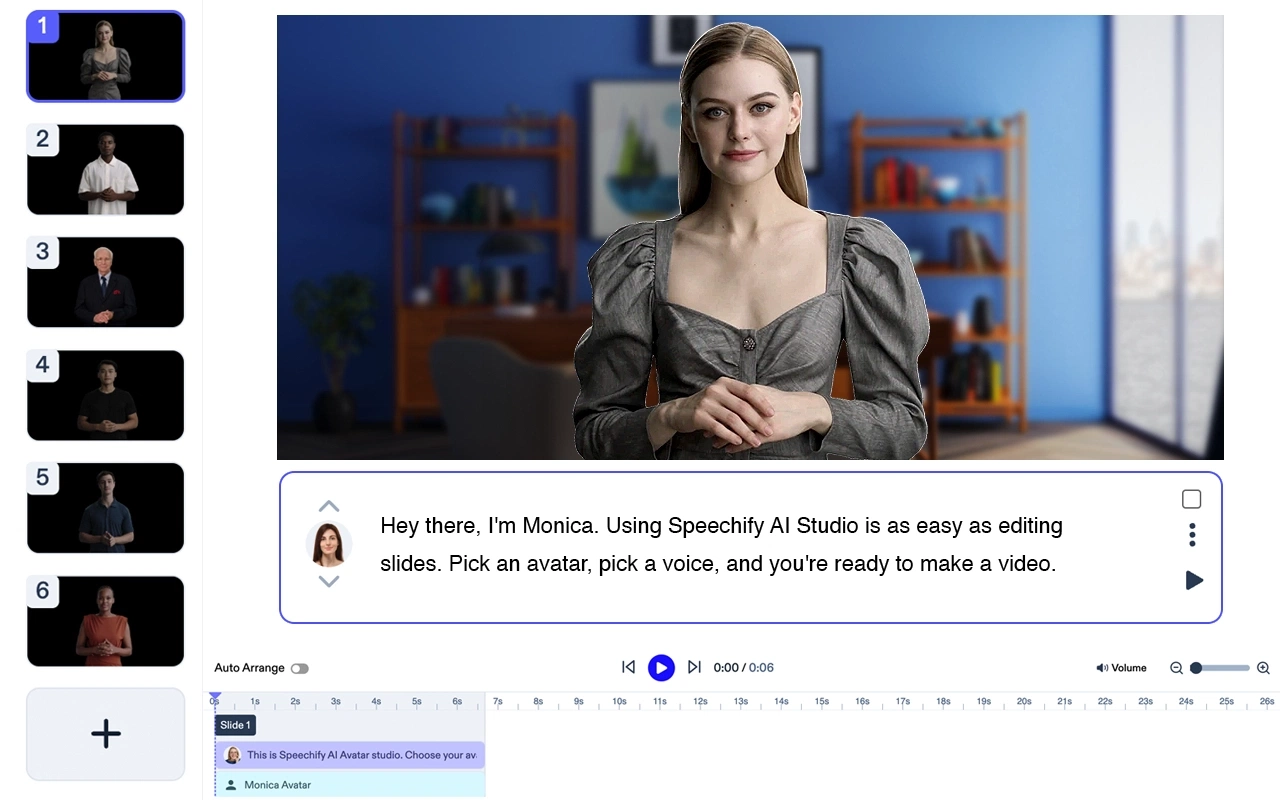
Speechify предлага мощно решение за създаване на висококачествени обучителни видеа с изкуствен интелект. Със своите напреднали възможности за преобразуване на текст във видео и AI гласове, Speechify дава възможност за създаване на ангажиращи и професионални презентационни видеа. Потребителите могат да използват широка гама от шаблони, AI аватари и анимации, за да обогатят своето видео съдържание. Чрез интеграция на технологията за преобразуване на текст в реч на Speechify лесно може да се добави озвучаване към обучителните видеа за постигане на плавно и потапящо учебно изживяване. С Speechify процесът на създаване на видеа с изкуствен интелект става ефективен и икономичен, като спестява време и ресурси в сравнение с традиционните методи за видео продукция. Платформата предлага функции като субтитри, персонализиране на шрифтове и възможност за генериране на видеа от текст, което я прави идеална за електронно обучение и въвеждащи материали. Независимо дали сте начинаещ или опитен видео създател, интуитивният интерфейс и уроците на Speechify ви предоставят всички необходими инструменти, за да започнете да създавате висококачествени обучителни видеа, подпомогнати от изкуствен интелект. Забравете за отнемащия време софтуер за монтаж и започнете да използвате силата на изкуствения интелект със Speechify за вашите нужди от обучително съдържание.



