

Tänapäeva digiajastul tahavad kõik videot teha – olgu isiklikel eesmärkidel, töö jaoks või lihtsalt sotsiaalmeedias jagamiseks. See juhend annab põhjaliku ülevaate, kuidas luua kaasahaaravaid videoid sõltumata kogemusest.
Kaks viisi video loomiseks – traditsiooniline ja tehisintellektipõhine
Videoid saab luua kahel peamisel moel: traditsiooniliselt ja tehisintellekti abil. Mõlemal on oma plussid ja miinused ning need sobivad eri sihtrühmadele ja eesmärkidele.
Traditsioonilise videote loomise protsess
Traditsiooniline videote loomine nõuab oskusi ja kogemust, aega, tehnikat ning tihti ka suuremaid kulusid. Siin on lühike ülevaade:
- Aeg: Videoprojekt võib võtta tunde kuni nädalaid, sõltuvalt mahust ja keerukusest.
- Oskused & teadmised: Vaja tunda võttenurki, valgustust, stsenaariumi kirjutamist, storyboard’e ja videotöötlust.
- Varustus: Kaamerad (DSLR, nutitelefon, kaameraga filmikaamera), statiiv, mikrofonid ja valgustus.
- Hind: Nutitelefoniga filmimine on soodne, kuid profitehnika maksab sadu kuni tuhandeid eurosid.
AI-videotöötluse protsess
Tehisintellektil põhinev videoloomine teeb kogu protsessi palju lihtsamaks:
- Ei mingit õpikõverat: AI-tööriistad on tavaliselt väga lihtsad ja sobivad hästi algajatele.
- Veebis: Enamik AI-videotööriistu töötab brauseris ega vaja paigaldamist.
- Pole vaja eritehnikat: Piisab suvalisest internetiühendusega seadmest.
- Hind: Sageli odavam kui traditsiooniline lähenemine, tihti on olemas ka tasuta paketid.
- Kiire: AI-videogenereerijad suudavad video luua mõne minutiga.
Video tegemine tasuta piltide ja videoklippidega
Platvormid nagu Canva ja veebipõhised videotööriistad pakuvad malle, kuhu saad lohistada oma pildid ja klipid, et kokku panna slaidiseansse või lühivideoid.
Videote loomine Windowsis
Windowsis on saadaval mitu videotöötlusprogrammi. Windows Movie Maker oli kunagi populaarne algajatele mõeldud lahendus, kuid Microsoft on selle nüüdseks lõpetanud.
Parim tasuta videote looja Windowsis
Shotcut paistab silma kui tasuta videotöötlustarkvara Windowsile, pakkudes rohkelt tööriistu, üleminekuid ja hõlpsasti kohandatavaid videomalle.
Windows Movie Makeri kasutamine
Kuigi aegunud, saad olemasolevat Windows Movie Makerit kasutada nii:
- Impordi oma videoklipid ja pildid.
- Lohista need ajajoonele.
- Lisa üleminekud, tekstikihid ja muusika.
- Vaata eelvaadet ja salvesta sobivas vormingus.
Loomingulisus videotes
Videod muutuvad kaasahaaravaks siis, kui:
- Kasutad animatsioone ja GIFe.
- Lisad taustamuusika või jutustuse.
- Katsetad üleminekuid ja efekte.
- Lisad vesimärgi või brändi sümboolika profiversioonides.
- Lood taustu pildigeneraatoritega.
10 parimat videotööriista
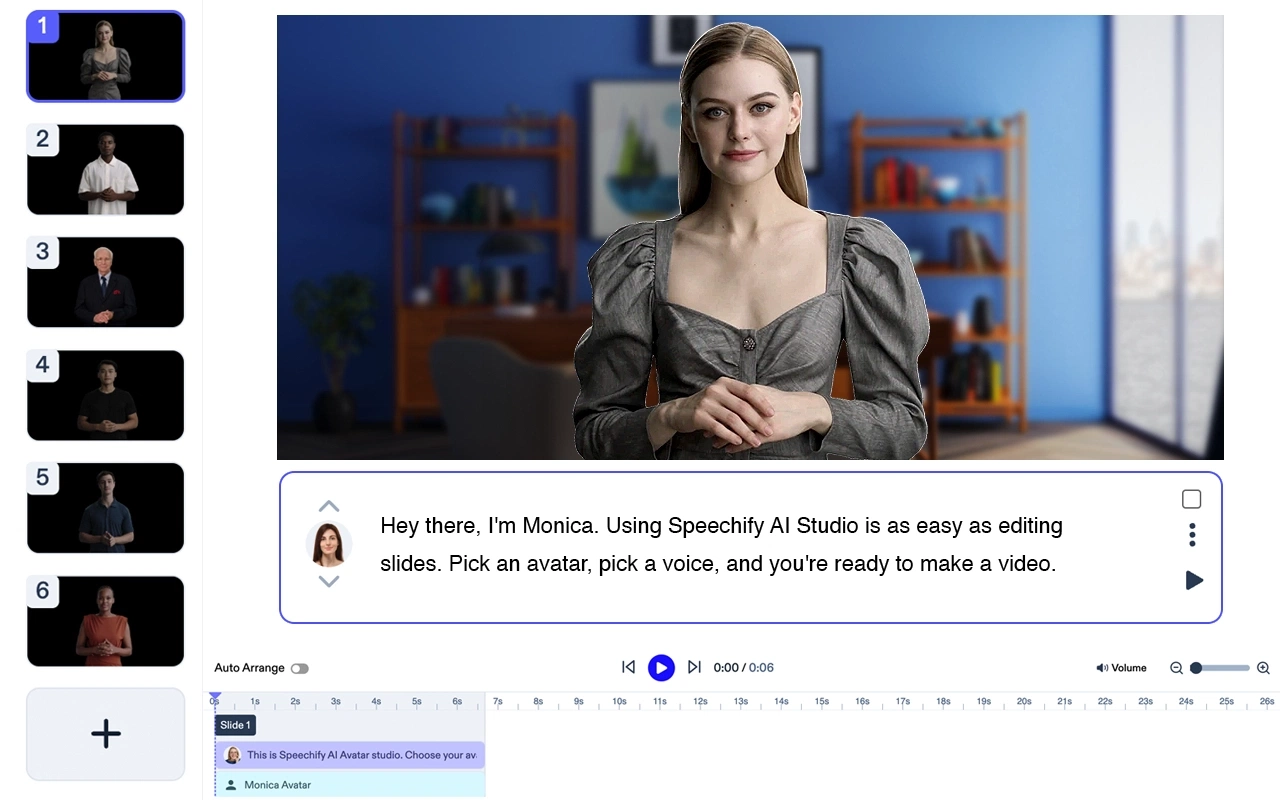
Speechify AI Video Generator
Hind: Proovi tasuta
Loo kvaliteetseid videoid ilma näitlejate ja profitehnikata. Muuda iga tekst AI-avatarite ja jutustusega kõrgekvaliteediliseks videoks – alla 5 minutiga.
Speechify avatari funktsioonid
- Vajad vaid sülearvutit
- Tööjõudu pole tarvis – video valmib minutitega
- Kasuta üht või mitut AI-avatari ilma lisatasuta
- Saad valmis video mõne minutiga
- Vaja on vaid minimaalset järeltöötlust. Õppimiskõver puudub.
Speechify on üks parimaid AI-vahendeid videote loomiseks. Lisaks iseseisva tootena integreerub see sujuvalt Speechify Studio AI-tööriistadega loojatele. Proovi tasuta järgi!
Adobe Premiere Pro

Professionaalne videomontaažiprogramm. Olulisemad omadused: mitmeformaadiline tugi, AI-abifunktsioonid, üleminekud, kõrge pildikvaliteet, värvikorrektsioon.
Hind: Alates $20.99/kuu.
Final Cut Pro

Ainult macOSile. Olulisemad omadused: magnetajaskaala, värvikorrektsioon, 360° videotöötlus, mitme kaamera tugi, HDR.
Hind: $299.99 ühekordne tasu.
iMovie

Hea algtase macOSi ja iPhone’i kasutajale. Omadused: valmismallid, videomõjud, roheekraan, tasuta muusika, 4K tugi.
Hind: Tasuta. Macis vaikimisi olemas.
Filmora

Kasutajasõbralik algajale. Tugevused: tekst, muusikakogu, kihid ja filtrid, põhjalikum videotöötlus, lohistamisliides.
Hind: Alates $39.99/aastas.
KineMaster (Android & iPhone)

Mobiilne videoredaktor. Tugevused: kiire eelvaade, mitu kihti, kiiruse muutmine, helifiltrid, roheekraan.
Hind: Alates $4.99/kuu.
InVideo
Veebipõhine videoloometööriist. Tugevused: 4000+ malli, tekst-videoks, AI, sotsiaalmeedia formaadid, kohandatav bränding.
Hind: Alates $15/kuu.
Camtasia

Ekraanisalvestus ja videotöötlus ühes. Peamised: ekraanisalvestus, märkused, efektid, lohistamisliides, animatsioonid.
Hind: Alates $249 ühekordne tasu.
Animaker

Animeeritud videote tegemise tööriist. Omadused: animeeritud mallid, lohistamisliides, tegelased, infograafika, diagrammid.
Hind: Alates $10/kuu.
Biteable
Veebipõhine videotööriist reklaami- ja selgitusvideote jaoks. Omadused: stock-klipid, animatsioonid, stseenide kohandamine, muusika, lihtne jagamine.
Hind: Alates $19/kuu.



