

No universo da criatividade digital, o Gerador de Colagem se destacou como uma ferramenta revolucionária que permite aos usuários combinar suas memórias e senso estético em colagens de fotos incríveis. Essa ferramenta inovadora oferece uma infinidade de opções, como vários modelos de colagem, ferramentas de edição e opções de personalização para criar uma colagem de fotos linda que capture perfeitamente a essência das suas memórias.
O que é um Gerador de Colagem?
Um Gerador de Colagem é uma ferramenta que permite criar lindas colagens de fotos combinando várias imagens em um único design harmonioso. Com uma variedade de modelos de colagem, elementos de design, fontes e ferramentas de edição de fotos à mão, você pode personalizar sua colagem como quiser. Alguns Geradores de Colagem também permitem adicionar desenhos, adesivos e textos para dar um toque bem pessoal à sua criação.
Principais Usos do Gerador de Colagem:
- Preservação de Memórias: Monte uma bela colagem com seus melhores momentos, seja um casamento, aniversário ou viagem.
- Posts para Redes Sociais: Crie colagens incríveis para posts e stories no Instagram.
- Presentes: Faça colagens de fotos personalizadas para presentear quem você ama.
- Convites para Eventos: Use modelos de colagem para criar convites modernos para eventos e festas.
- Promoções Empresariais: Traga a identidade da sua marca para colagens criadas para divulgar o seu negócio.
- Projetos Educacionais: Deixe seus trabalhos escolares ainda mais interessantes com colagens informativas e visualmente atrativas.
- Mood Boards: Monte painéis de inspiração reunindo imagens e elementos para seus projetos criativos.
- Design Gráfico: Use o gerador de colagem como ferramenta de design gráfico para criar visuais para seu site ou blog.
- Decoração de Casa: Imprima colagens de fotos em alta resolução e use-as como peças únicas de decoração.
- Scrapbooking: Crie páginas de scrapbook digitalmente usando o gerador de colagens.
Como Fazer uma Colagem com IA:
Usar IA em Geradores de Colagens pode deixar o processo de criação muito mais prático. Basta enviar suas fotos, e a IA irá analisá-las para sugerir os melhores layouts e elementos de design que valorizem suas imagens. Algumas ferramentas também contam com removedores de fundo e outros recursos avançados para levar sua colagem a outro patamar.
Como Fazer uma Colagem de Vídeo:
Colagens de vídeo são uma forma moderna de mostrar suas memórias. Para fazer uma colagem de vídeo, escolha um app ou ferramenta que aceite arquivos de vídeo. Envie seus clipes e organize-os na disposição desejada. Personalize a colagem com textos, adesivos e outros elementos antes de salvar e compartilhar.
Como Criar Colagens no Smartphone:
Muitos Geradores de Colagem oferecem aplicativos para iPhone e Android. Basta baixar o app, enviar as fotos e começar a criar sua colagem usando as diversas ferramentas de edição e modelos disponíveis. Alguns aplicativos também oferecem tutoriais para você tirar o máximo proveito de todos os recursos.
Como Fazer uma Colagem de Fotos:
Fazer uma colagem de fotos é muito simples com um Gerador de Colagem. Comece escolhendo o modelo ou layout de colagem que você mais gostar. Em seguida, envie suas fotos e organize-as como preferir. Personalize com textos, adesivos e outros elementos de design. Quando estiver satisfeito com o resultado, salve e compartilhe sua bela colagem de fotos.
Como Fazer uma Colagem de Fotos no Computador:
Para criar uma colagem de fotos no computador, escolha um Gerador de Colagem compatível com seu sistema operacional. Envie as imagens e selecione o modelo desejado. Personalize acrescentando texto, adesivos, fontes e outros elementos de design. Salve sua bela colagem de fotos em alta resolução e compartilhe com amigos e familiares.
Principais Geradores de Colagem com IA:
Speechify Studio
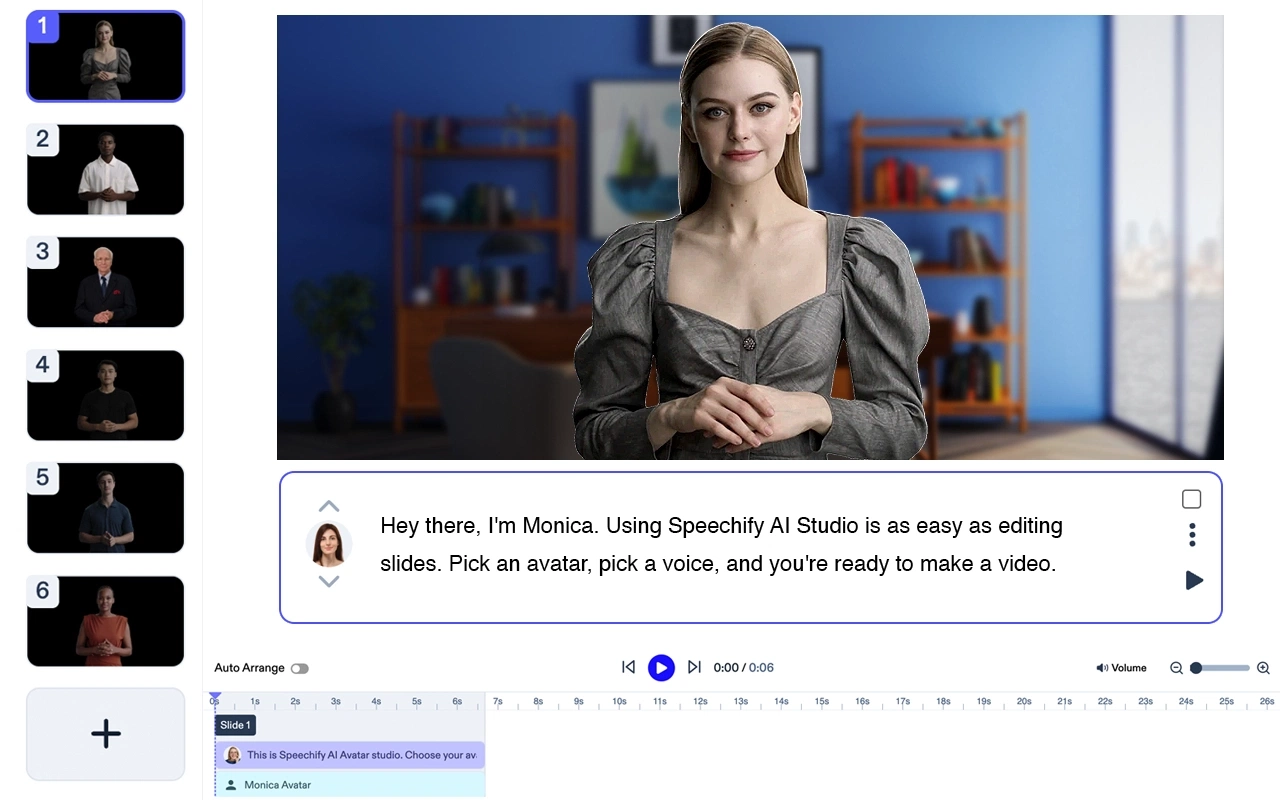
Preço: Gratuito para testar
Speechify Studio é uma suíte completa de IA criativa para pessoas e equipes. Crie vídeos de IA incríveis a partir de prompts de texto, adicione narração, música de fundo e imagens gratuitas de banco de dados. Todos os seus projetos podem ser usados livremente para fins pessoais ou comerciais.
Principais funcionalidades: Modelos, texto para vídeo, edição em tempo real, redimensionamento, transcrição, ferramentas para marketing em vídeo.
O Speechify é, sem dúvida, a melhor opção para vídeos de avatar gerados por IA. Sozinho, já é um excelente produto, e ainda oferece integração perfeita com a suíte Speechify Studio de produtos de IA para criadores. Perfeito para equipes de todos os tamanhos.
Canva:
O Canva é um criador de colagens de fotos online popular, com uma variedade de modelos, fontes e elementos de design. A ferramenta também oferece recursos com IA, como removedor de fundo e efeitos de fotos.
Custo: Gratuito com recursos pagos opcionais
Top 5 funcionalidades:
- Interface amigável
- Grande variedade de modelos de colagem
- Ferramentas de edição de fotos com IA
- Downloads em alta qualidade
- Recursos de colaboração
Fotor:
O Fotor é um editor de fotos versátil e criador de colagens com recursos como efeitos de fotos, adesivos e layouts variados. A ferramenta também oferece recursos com IA, como aprimoramento de fotos.
Custo: Gratuito com recursos pagos opcionais
Top 5 funcionalidades:
- Grande variedade de efeitos para fotos
- Aprimoramento de fotos com IA
- Diversidade de layouts de colagem
- Opções de adesivos e texto
- Downloads em alta resolução
PicCollage:
O PicCollage é um app fácil de usar que permite criar lindas colagens de fotos com praticidade. O aplicativo oferece diversas opções de layout de colagem, adesivos e fontes para personalizar sua criação.
Custo: Gratuito com compras no app
Top 5 funcionalidades:
- Interface intuitiva
- Grande variedade de layouts de colagem
- Biblioteca de adesivos extensa
- Diversidade de fontes
- Downloads em alta resolução
Adobe Spark:
O Adobe Spark é uma poderosa ferramenta de design gráfico que permite criar colagens de fotos de tirar o fôlego com resultados profissionais de alta qualidade. A ferramenta oferece diversos modelos de colagem, fontes e elementos de design.
Custo: Gratuito com recursos pagos opcionais
Top 5 funcionalidades:
- Resultados profissionais de alta qualidade
- Grande variedade de modelos de colagem
- Diversidade de fontes e elementos de design
- Downloads em alta resolução
- Integração com outros apps da Adobe Creative Cloud
PhotoGrid:
O PhotoGrid é um editor de fotos completo e criador de colagens que oferece recursos como layouts de colagem, adesivos e fontes. Também inclui funcionalidades com IA, como corte inteligente e efeitos de fotos.
Custo: Gratuito com compras no app
Top 5 funcionalidades:
- Grande variedade de layouts de colagem
- Corte inteligente e efeitos de foto
- Biblioteca de adesivos extensa
- Diversidade de fontes
- Downloads em alta resolução
PicsArt:
O PicsArt é um editor de fotos e criador de colagens muito popular, com uma variedade de layouts, adesivos e fontes. Também oferece funcionalidades com IA, como removedor de fundo e efeitos em fotos.
Custo: Gratuito com recursos pagos opcionais
Top 5 funcionalidades:
- Interface intuitiva
- Grande variedade de layouts de colagem
- Removedor de fundo por IA
- Biblioteca de adesivos extensa
- Diversidade de fontes
Ribbet:
O Ribbet é um editor de fotos versátil e criador de colagens, com recursos como layouts de colagem, adesivos e fontes. Ele também conta com funcionalidades com IA, como removedor de fundo e efeitos de fotos.
Custo: Gratuito com recursos pagos opcionais
Top 5 funcionalidades:
- Interface intuitiva
- Grande variedade de layouts de colagem
- Removedor de fundo por IA
- Biblioteca de adesivos extensa
- Diversidade de fontes
Crello:
O Crello é uma ferramenta de design gráfico fácil de usar que permite criar colagens de fotos impressionantes com facilidade. Oferece diversos modelos de colagem, fontes e elementos de design para personalizar seu projeto.
Custo: Gratuito com recursos pagos opcionais
Top 5 funcionalidades:
- Interface fácil de usar
- Grande variedade de modelos de colagem
- Diversidade de fontes e elementos de design
- Downloads em alta resolução
- Recursos de colaboração
BeFunky:
O BeFunky é um editor de fotos poderoso e criador de colagens, com recursos como vários layouts de colagem, adesivos e fontes. A ferramenta também inclui funcionalidades com IA, como efeitos de fotos e corte inteligente.
Custo: Gratuito com recursos pagos opcionais
Top 5 funcionalidades:
- Interface intuitiva
- Grande variedade de layouts de colagem
- Efeitos de fotos com IA
- Biblioteca de adesivos extensa
- Diversidade de fontes
Perguntas Frequentes:
Qual o melhor criador de colagens gratuito online?
Canva e Fotor são dois dos melhores criadores de colagens gratuitos online, oferecendo várias funcionalidades e opções de personalização.
Existe algum criador de colagens totalmente gratuito?
Sim, existem vários criadores de colagens totalmente gratuitos online, como o Canva e o Fotor, que oferecem diversos recursos para criar colagens de fotos impressionantes.
Como fazer uma colagem grátis online?
Você pode usar criadores de colagens gratuitos online como Canva e Fotor. Basta enviar suas fotos, escolher um modelo de colagem, personalizá-lo com texto, adesivos e outros elementos e, depois, baixar sua criação.




