

Na era digital de hoje, todo mundo quer fazer um vídeo, seja por razões pessoais, trabalho ou apenas para compartilhar nas redes sociais. Este guia completo aprofunda as diferentes formas de criar conteúdos em vídeo envolventes, independentemente do seu nível de experiência.
As Duas Maneiras de Fazer um Vídeo - Tradicional e com IA
Existem dois métodos principais para fazer um vídeo: o método tradicional e o método com IA. Ambos têm suas vantagens e desvantagens, indicados para diferentes públicos e objetivos.
Processo Tradicional de Produção de Vídeo
Criar um vídeo da forma tradicional exige um certo nível de habilidades e conhecimento, tempo, equipamentos e, às vezes, um custo considerável. Veja a divisão:
- Tempo: Um vídeo típico pode levar de algumas horas até semanas, dependendo do escopo do projeto.
- Habilidades & Conhecimento: Isso inclui entender ângulos de gravação, iluminação, roteirização, storyboard e edição de vídeo.
- Equipamento: Câmeras (DSLR, smartphone, filmadora), tripés, microfones e iluminação.
- Custo: Embora usar seu smartphone possa ser mais econômico, equipamentos profissionais podem custar de centenas a milhares de dólares.
Processo de Criação de Vídeos com IA
O método com IA simplifica bastante o processo de criação de vídeo:
- Zero Curva de Aprendizagem: Ferramentas de IA geralmente têm interfaces fáceis e intuitivas para iniciantes.
- Direto no Navegador: A maioria dos editores de vídeo com IA são online, sem necessidade de download.
- Sem Equipamento Especial: Use qualquer dispositivo com conexão à internet.
- Custo: Geralmente mais barato que métodos tradicionais, muitos com opções gratuitas.
- Rápido: Geradores de vídeo com IA podem transformar texto em vídeo em poucos minutos.
Como Fazer Vídeo com Fotos e Vídeos Gratuitamente
Plataformas como o Canva e ferramentas online de criação de vídeo oferecem modelos personalizáveis, onde você pode arrastar e soltar suas fotos e clipes de vídeo para criar slideshows ou vídeos curtos.
Criando Vídeos no Windows
O Windows oferece uma variedade de softwares de edição de vídeo. Windows Movie Maker, uma ferramenta amigável para iniciantes, era muito popular, mas a Microsoft descontinuou o programa.
Melhor Editor de Vídeo Gratuito para Windows
O Shotcut se destaca como um editor de vídeo gratuito e robusto para Windows, oferecendo uma ampla variedade de ferramentas de edição, transições e modelos de vídeo personalizáveis.
Usando o Windows Movie Maker
Embora desatualizado, se você ainda tiver o Windows Movie Maker instalado:
- Comece importando seus vídeos e fotos.
- Arraste-os para a linha do tempo.
- Adicione transições, textos e músicas de fundo.
- Pré-visualize e salve no formato desejado.
Adicionando Mais Criatividade aos Vídeos
Para deixar seus vídeos mais atrativos:
- Use animações e GIFs.
- Adicione narrações ou música de fundo.
- Experimente transições e sobreposições.
- Insira marcas d'água ou logotipos para vídeos profissionais.
- Utilize geradores de imagens para criar fundos dinâmicos.
Top 10 Ferramentas para Fazer um Vídeo
Speechify Gerador de Vídeo com IA
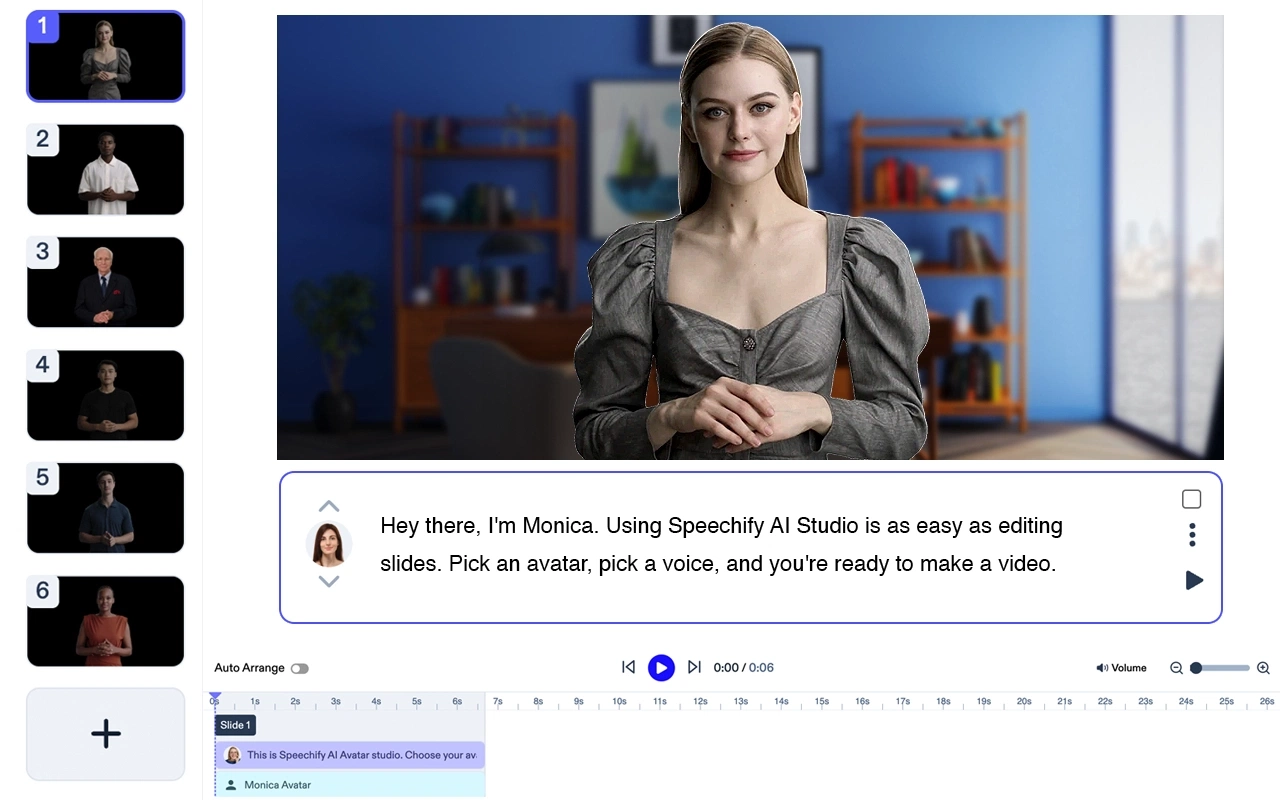
Preço: Gratuito para testar
Crie vídeos profissionais sem atores nem equipamentos. Transforme qualquer texto em vídeo de alta qualidade com avatares de IA e narração – em menos de 5 minutos.
Recursos do Speechify Avatar Generator
- Tudo o que você precisa é de um laptop
- Sem equipe. Você cria um vídeo em poucos minutos
- Use um ou vários avatares de IA sem custo adicional
- Tenha seu vídeo pronto em minutos
- Pouca ou nenhuma edição. Zero curva de aprendizagem.
Speechify é claramente a melhor opção de IA para fazer vídeos. Além de ser excelente como produto individual, integra-se perfeitamente à suíte Speechify Studio de produtos de IA para criadores.Experimente gratuitamente!
Adobe Premiere Pro
Ferramenta profissional de edição de vídeo. Principais recursos: suporte a múltiplos formatos, edição de vídeo com IA, transições avançadas, exportação de vídeos em alta qualidade, correção de cor profissional.
Custo: A partir de $20,99/mês.
Final Cut Pro
Exclusivo para macOS. Principais recursos: linha do tempo magnética, gradação de cor avançada, edição de vídeo em 360°, edição multicâmera, suporte a HDR.
Custo: $299,99 pagamento único.
iMovie

Ideal para iniciantes em macOS e iPhone. Principais recursos: modelos prontos, efeitos de vídeo, efeito de tela verde, músicas sem royalties, suporte a resolução 4K.
Custo: Gratuito. Incluso por padrão nos Macs
Filmora
Fácil de usar para iniciantes. Principais recursos: textos e títulos, biblioteca de músicas, overlays e filtros, edição avançada de vídeo, interface de arrastar e soltar.
Custo: A partir de $39,99/ano.
KineMaster (Android & iPhone)

Editor de vídeo para celular. Principais recursos: pré-visualização instantânea, edição com múltiplas camadas, controle de velocidade, filtros de áudio, chroma key.
Custo: A partir de $4,99/mês.
InVideo
Criador de vídeos online. Principais recursos: mais de 4000 modelos, texto para vídeo, criação de vídeo com IA, integração com redes sociais, personalização de marca.
Custo: A partir de $15/mês.
Camtasia

Gravação de tela e edição de vídeo. Principais recursos: gravador de tela, anotações, efeitos de vídeo, editor de arrastar e soltar, animações personalizáveis.
Custo: A partir de $249 pagamento único.
Animaker

Ferramenta para criação de vídeos animados. Principais recursos: modelos animados, interface de arrastar e soltar, personagens customizáveis, infográficos, gráficos animados.
Custo: A partir de $10/mês.
Biteable
Criador de vídeos online para vídeos promocionais e explicativos. Principais recursos: clipes de vídeo stock, animações, cenas personalizáveis, biblioteca musical, compartilhamento em redes sociais.
Custo: A partir de $19/mês.




