

Na era digital de hoje, as pessoas buscam constantemente maneiras criativas de registrar e valorizar seus momentos mais especiais. Uma dessas ferramentas incríveis que revolucionou a forma como preservamos memórias é o Criador de Vídeos com Fotos. Essa ferramenta junta fotos e vídeos de forma perfeita, proporcionando uma experiência imersiva de contar histórias.
O que é o Criador de Vídeos com Fotos?
O Criador de Vídeos com Fotos é um software de edição de vídeo que combina imagens, músicas e animações para criar vídeos incríveis. Com uma variedade de ferramentas de edição, você pode facilmente adicionar transições, modelos de vídeo, figurinhas e muito mais para criar conteúdos visuais atraentes. Seja você profissional ou iniciante, essas ferramentas foram feitas para serem fáceis de usar e oferecem resultados de alta qualidade.
Top 10 Usos do Criador de Vídeos com Fotos
- Postagens em Redes Sociais: Crie conteúdos de arrasar para as redes sociais, que realmente se destacam no meio da multidão. Misture fotos, músicas e animações para deixar suas postagens inesquecíveis.
- Slideshows de Aniversário: Junte todos os momentos especiais de uma festa de aniversário em um vídeo lindo, com trilha sonora e animações.
- Vídeos de Casamento: Combine fotos e trechos de vídeo de um casamento para criar um filme emocionante que capture a essência desse dia único.
- Vlogs de Viagem: Reúna suas fotos e vídeos de viagem com música de fundo para criar um vlog envolvente e cheio de lembranças.
- Apresentações Empresariais: Monte apresentações profissionais combinando fotos, vídeos e animações.
- Videoclipes Musicais: Dê vida à sua música criando videoclipes com suas fotos e vídeos.
- Tutoriais Educacionais: Crie tutoriais combinando fotos, vídeos e narrações.
- Vídeos Promocionais: Produza vídeos promocionais para o seu negócio unindo fotos, vídeos e animações.
- Saudações de Feriado: Envie mensagens especiais criando vídeos com fotos, música e animações.
- Presentes Personalizados: Crie presentes personalizados em vídeo reunindo fotos e vídeos de pessoas queridas.
Como Fazer um Vídeo com Fotos?
- Comece selecionando suas fotos: Escolha as fotos que deseja incluir no seu vídeo.
- Envie as fotos para o Criador de Vídeos com Fotos: Use o recurso de arrastar e soltar para adicionar suas fotos ao editor.
- Adicione transições e animações: Escolha entre várias transições e animações para dar vida ao seu vídeo.
- Inclua músicas ou narrações: Adicione trilha sonora ou narrações para enriquecer seu vídeo.
- Salve e compartilhe seu vídeo: Quando estiver satisfeito, salve o vídeo e compartilhe nas redes sociais ou com pessoas queridas.
O que é o Criador de Vídeo Fácil com Fotos e Música?
O criador de vídeo fácil com fotos e música é uma ferramenta intuitiva, perfeita para iniciantes. Oferece recursos simples de arrastar e soltar e uma variedade de faixas musicais prontas, facilitando a criação de vídeos. Os usuários também podem adicionar suas próprias músicas, fontes e sobreposições para personalizar seus vídeos.
Existe um editor de vídeo com fotos e música grátis?
Sim, existem vários criadores de vídeo gratuitos disponíveis online que permitem criar vídeos com fotos e música. Essas ferramentas oferecem funções básicas de edição e podem incluir marca-d'água no vídeo final.
Como Ganhar Dinheiro com Criador de Vídeos com Fotos?
- Crie e venda vídeos personalizados: Ofereça seus serviços para produzir vídeos personalizados para aniversários, casamentos ou outras ocasiões especiais.
- Ofereça serviços de edição de vídeo: Use suas habilidades de edição de vídeo para atender empresas ou pessoas físicas que queiram criar vídeos promocionais ou pessoais.
- Crie vídeos para bancos de imagem: Produza vídeos para bancos de imagens e venda-os em plataformas como Shutterstock ou Adobe Stock.
- Ofereça tutoriais online: Crie e venda tutoriais online ensinando como usar o Criador de Vídeos com Fotos.
- Crie conteúdo para redes sociais: Produza vídeos para publicar nas redes sociais e lucre com posts patrocinados ou anúncios.
Top 10 Criadores de Vídeos com Fotos
Speechify Studio
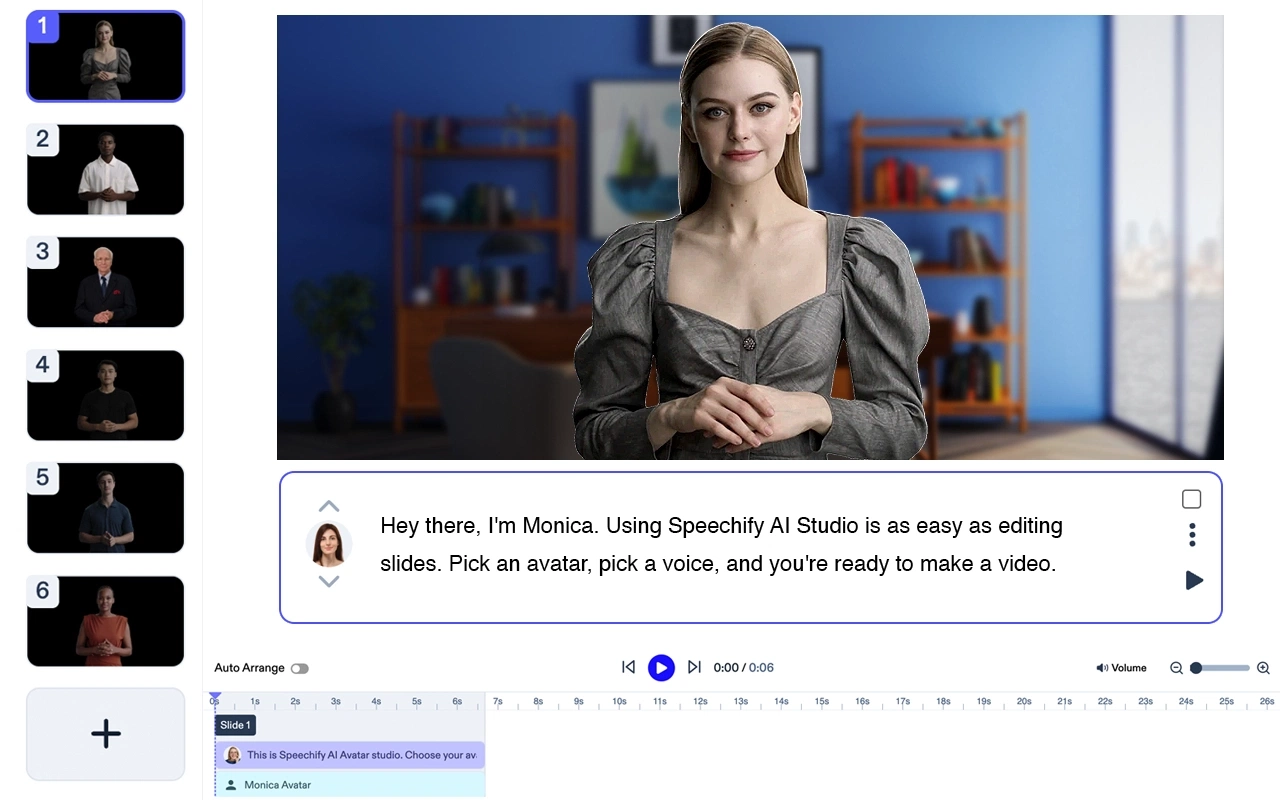
Preço: Gratuito para testar
Speechify Studio é uma suíte criativa de IA completa para indivíduos e equipes. Crie vídeos de IA impressionantes a partir de prompts de texto, adicione narração, trilha sonora e imagens gratuitas. Todos os seus projetos são gratuitos para uso pessoal ou comercial.
Principais recursos: Modelos, transformação de texto em vídeo, edição em tempo real, redimensionamento, transcrição, ferramentas de marketing em vídeo.
O Speechify é, sem dúvida, a melhor opção para gerar vídeos de avatar. Por si só já é um ótimo produto, mas também se integra perfeitamente à suíte de produtos de IA do Speechify Studio para criadores. Perfeito para equipes de todos os tamanhos.
Adobe Premiere Pro
Um software de edição de vídeo profissional que oferece uma variedade de recursos avançados para criar vídeos de alta qualidade.
Preço: A partir de US$ 20,99/mês
Top 5 recursos:
- Ferramentas de edição extensas
- Grande variedade de modelos de vídeo
- Integração com a Adobe Creative Cloud
- Opções avançadas de gradação de cor
- Suporte a vídeos em VR e 360 graus
Filmora

Um editor de vídeos fácil de usar, com uma enorme variedade de recursos criativos.
Preço: A partir de US$ 7,99/mês
Top 5 recursos:
- Interface intuitiva de arrastar e soltar
- Variedade de transições e efeitos
- Suporte à resolução 4K
- Ferramentas de edição de áudio
- Biblioteca de músicas livres de direitos autorais
iMovie

Um software de edição de vídeos gratuito para Mac e iOS, perfeito para iniciantes.
Preço: Gratuito para dispositivos Apple
Top 5 recursos:
- Interface simples
- Faixas de músicas pré-carregadas
- Integração com dispositivos Apple
- Suporte à resolução 4K
- Textos e títulos animados
InShot

Um app de edição de vídeos para celular com diversas funcionalidades para criar vídeos de qualquer lugar.
Preço: Gratuito com compras dentro do app
Top 5 recursos:
- Interface de fácil uso
- Vários filtros e efeitos
- Ferramentas de edição de áudio
- Ajuste de velocidade do vídeo
- Biblioteca de stickers e emojis
Magisto

Editor de vídeo com IA que simplifica a criação de vídeos.
Preço: A partir de US$ 4,99/mês
Top 5 recursos:
- Ferramentas de edição baseadas em IA
- Vários modelos de vídeo
- Biblioteca musical com faixas licenciadas
- Integração com redes sociais
- Analytics para usuários empresariais
Animoto
Um criador de vídeos com fotos online com diversos modelos e recursos para criar slideshows.
Preço: A partir de US$ 8/mês
Top 5 recursos:
- Interface fácil de usar
- Diversidade de modelos de slideshow
- Biblioteca musical com faixas licenciadas
- Qualidade de vídeo em HD
- Integração com redes sociais
KineMaster

Um editor de vídeo poderoso para dispositivos móveis Android e iOS.
Preço: Gratuito com compras dentro do app
Top 5 recursos:
- Edição de vídeo em múltiplas camadas
- Suporte à resolução 4K
- Grande variedade de transições e efeitos
- Ferramentas de edição de áudio
- Suporte a várias trilhas de áudio
PowerDirector

Um software de edição de vídeo versátil com recursos avançados para Windows e Android.
Preço: A partir de US$ 4,33/mês
Top 5 recursos:
- Suporte à resolução 4K
- Variedade de modelos e efeitos
- Linha do tempo multitrilha
- Rastreamento de movimento
- Ferramentas de edição de áudio
Quik da GoPro
Um editor de vídeo gratuito para celulares, perfeito para criar vídeos rápidos e práticos de onde estiver.
Preço: Gratuito
Top 5 recursos:
- Criação automática de vídeo
- Variedade de modelos de vídeo
- Integração com câmeras GoPro
- Suporte à qualidade de vídeo HD
- Biblioteca musical com faixas licenciadas
FAQ
Qual é o melhor criador de vídeos com fotos?
O Adobe Premiere Pro é considerado um dos melhores criadores de vídeos com fotos devido à sua ampla gama de recursos avançados.
Qual aplicativo é melhor para criar vídeos com fotos gratuitamente?
O iMovie é uma ótima opção gratuita para criar vídeos com fotos, especialmente para quem possui dispositivos Apple.
Qual é o site que cria vídeo com imagens?
O Animoto é um site popular que cria vídeos com imagens e oferece diversas opções de modelos e funções.




