

U digitalnoj kreativnosti, generator kolaža donosi pravu revoluciju spajajući uspomene i estetiku u zadivljujuće foto kolaže. Ovaj inovativni alat nudi brojne predloške, alate za uređivanje i mogućnosti prilagodbe kako biste stvorili predivan foto kolaž koji doista ističe bit vaših uspomena.
Što je generator kolaža?
Generator kolaža je alat kojim kombinirate više fotografija u jedan atraktivan dizajn. Uz razne predloške, elemente dizajna, fontove i alate za uređivanje, možete u potpunosti prilagoditi svoj kolaž. Neki alati omogućuju i dodavanje crteža, naljepnica i teksta za osobni pečat.
Najčešće primjene generatora kolaža:
- Čuvanje uspomena: Izradite predivan foto kolaž omiljenih trenutaka poput vjenčanja, rođendana ili putovanja.
- Objave na društvenim mrežama: Kreirajte dojmljive kolaže za Instagram objave i priče.
- Pokloni: Napravite personalizirane foto kolaže za drage osobe.
- Pozivnice za događanja: Iskoristite predloške za moderne pozivnice za evente i zabave.
- Promocija poslovanja: Uskladite dizajn s brendom i napravite kolaže za promociju svoje firme.
- Obrazovni projekti: Podignite projekte na višu razinu uz vizualno privlačne kolaže.
- Mood boardovi: Posložite slike i elemente za izradu inspirativnih mood boardova.
- Grafički dizajn: Iskoristite generator kolaža za vizuale weba ili bloga.
- Uređenje doma: Isprintajte kvalitetne foto kolaže kao dekor za svoj dom.
- Digitalni scrapbooking: Izradite scrapbook stranice u digitalnom obliku.
Kako napraviti kolaž pomoću AI-ja:
Korištenje AI-ja u generatorima kolaža znatno olakšava cijeli proces. Dovoljno je učitati fotografije, a AI će predložiti optimalan raspored i dizajnerske elemente za vaše slike. Neki alati nude i uklanjanje pozadine te druge napredne funkcije.
Kako napraviti video kolaž:
Video kolaži su moderan način dijeljenja uspomena. Odaberite aplikaciju koja podržava video, učitajte isječke, posložite ih kako želite te dodajte tekst, naljepnice ili druge elemente prije spremanja i dijeljenja.
Kako napraviti kolaž sa smartfona:
Mnogi alati za kolaže nude mobilne aplikacije za iPhone i Android. Preuzmite aplikaciju, učitajte fotografije i kreirajte kolaž pomoću dostupnih alata i predložaka. Neke aplikacije nude i kratke tutorijale za brže snalaženje.
Kako napraviti kolaž od slika:
Izrada kolaža od slika vrlo je jednostavna s generatorom kolaža. Odaberite predložak, učitajte slike i posložite ih prema želji. Dodajte tekst, naljepnice i druge elemente, zatim spremite i podijelite svoj rad.
Kako napraviti foto kolaž na računalu:
Za izradu foto kolaža na računalu odaberite generator koji podržava vaš operativni sustav. Učitajte slike, izaberite predložak i prilagodite ga tekstom, naljepnicama ili fontovima. Spremite svoj foto kolaž u visokoj rezoluciji i podijelite ga s drugima.
Najbolji AI generatori kolaža:
Speechify Studio
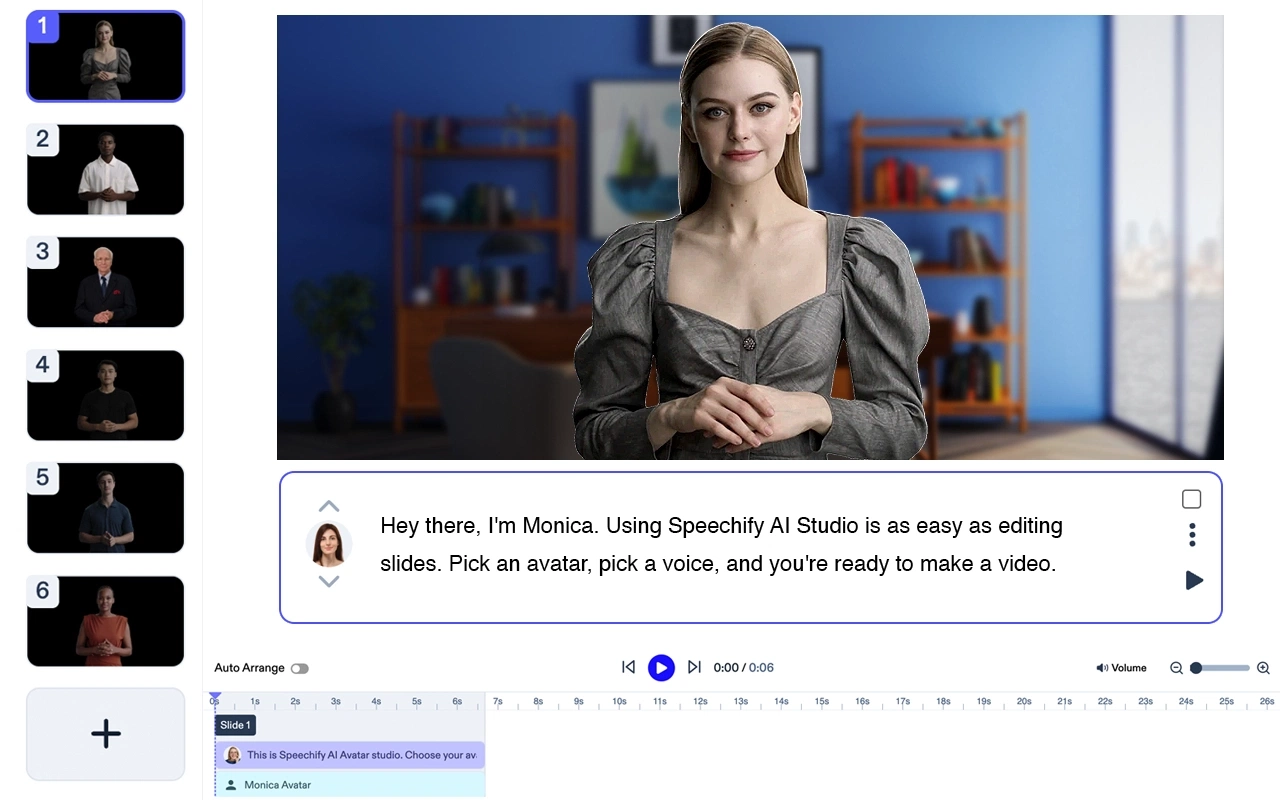
Cijena: besplatno za isprobavanje
Speechify Studio je kompletan AI kreativni paket za pojedince i timove. Izradite zapanjujuće AI video uratke iz tekstualnog opisa, dodajte voiceover, glazbu i besplatne slike. Svi projekti su besplatni za osobnu i poslovnu upotrebu.
Glavne značajke: predlošci, tekst u video, uređivanje u stvarnom vremenu, promjena veličine, transkripcija, alati za video marketing.
Speechify je odličan izbor za generiranje avatar videa. Odlično funkcionira samostalno, a nudi i besprijekornu integraciju sa Speechify Studio AI rješenjima. Idealan je za timove svih veličina.
Canva:
Canva je popularni online alat za izradu kolaža s brojnim predlošcima, fontovima i elementima dizajna. Također nudi AI funkcije poput uklanjanja pozadine i efekata na fotografijama.
Cijena: besplatno, uz opcionalne plaćene funkcije
Top 5 značajki:
- Jednostavno sučelje
- Širok izbor predložaka
- AI alati za uređivanje fotografija
- Visoka kvaliteta preuzimanja
- Mogućnosti suradnje
Fotor:
Fotor je svestrani uređivač i alat za kolaže s raznim efektima, naljepnicama i rasporedima. Ima i AI funkcije za poboljšanje fotografija.
Cijena: besplatno, uz opcionalne plaćene funkcije
Top 5 značajki:
- Različiti foto efekti
- AI poboljšanje slika
- Velik izbor kolaž rasporeda
- Naljepnice i tekst
- Visoka rezolucija preuzimanja
PicCollage:
PicCollage je jednostavna aplikacija za izradu foto kolaža. Nudi razne rasporede, naljepnice i fontove za prilagodbu vaših kolaža.
Cijena: besplatno, s kupnjama u aplikaciji
Top 5 značajki:
- Intuitivno sučelje
- Mnogobrojni rasporedi kolaža
- Velika kolekcija naljepnica
- Razni fontovi
- Visoka rezolucija preuzimanja
Adobe Spark:
Adobe Spark je moćan alat za izradu profesionalnih foto kolaža. Nudi širok izbor predložaka, fontova i dizajnerskih elemenata.
Cijena: besplatno, uz opcionalne plaćene funkcije
Top 5 značajki:
- Profesionalni rezultati
- Mnogi predlošci kolaža
- Razni fontovi i elementi
- Visoka kvaliteta preuzimanja
- Integracija s Adobe Creative Cloudom
PhotoGrid:
PhotoGrid je sveobuhvatni uređivač i generator kolaža koji nudi rasporede, naljepnice i fontove. Također ima AI funkcije poput pametnog rezanja i foto efekata.
Cijena: besplatno, s kupnjama u aplikaciji
Top 5 značajki:
- Razni rasporedi kolaža
- Pametno rezanje i efekti
- Bogata kolekcija naljepnica
- Razni fontovi
- Visoka rezolucija preuzimanja
PicsArt:

PicsArt je popularan uređivač slika i generator kolaža s raznim rasporedima, naljepnicama i fontovima. Nudi AI funkcije poput uklanjanja pozadine i foto efekata.
Cijena: besplatno, uz opcionalne plaćene funkcije
Top 5 značajki:
- Intuitivno sučelje
- Širok izbor rasporeda kolaža
- AI uklanjanje pozadine
- Velika kolekcija naljepnica
- Razni fontovi
Ribbet:
Ribbet je svestrani uređivač fotografija i generator kolaža s raznim rasporedima, naljepnicama i fontovima. Nudi AI mogućnosti uklanjanja pozadine i foto efekata.
Cijena: besplatno, uz opcionalne plaćene funkcije
Top 5 značajki:
- Intuitivno sučelje
- Velik izbor rasporeda
- AI uklanjanje pozadine
- Bogata kolekcija naljepnica
- Razni fontovi
Crello:
Crello je jednostavan alat za grafiku s kojim lako izrađujete atraktivne foto kolaže. Nudi razne predloške, fontove i dizajnerske elemente za personalizaciju.
Cijena: besplatno, uz opcionalne plaćene funkcije
Top 5 značajki:
- Jednostavno korisničko sučelje
- Mnogi predlošci kolaža
- Razni fontovi i elementi
- Visoka kvaliteta preuzimanja
- Mogućnosti suradnje
BeFunky:
BeFunky je snažan uređivač fotografija i generator kolaža s raznim rasporedima, naljepnicama i fontovima. Ima AI funkcije poput foto efekata i pametnog rezanja.
Cijena: besplatno, uz opcionalne plaćene funkcije
Top 5 značajki:
- Intuitivno sučelje
- Razni rasporedi kolaža
- AI foto efekti
- Velika kolekcija naljepnica
- Razni fontovi
Često postavljena pitanja:
Koji je najbolji besplatni online alat za kolaže?
Canva i Fotor dvije su od najboljih besplatnih online aplikacija za izradu kolaža s brojnim mogućnostima prilagodbe.
Postoji li potpuno besplatan alat za izradu kolaža?
Da, postoji nekoliko potpuno besplatnih online alata, poput Canve i Fotora, s bogatim opcijama za izradu foto kolaža.
Kako napraviti besplatan kolaž online?
Koristite besplatne online alate poput Canve ili Fotora. Učitajte slike, izaberite predložak, prilagodite ga tekstom, naljepnicama i ostalim elementima te preuzmite svoj rad.



