

U današnje digitalno doba ljudi neprestano traže nove, kreativne načine za bilježenje i čuvanje posebnih trenutaka. Jedan sjajan alat koji je promijenio način na koji čuvamo uspomene je izrada videozapisa od fotografija. Ovaj alat spaja fotografije i videozapise te omogućuje potpuno novi doživljaj pripovijedanja.
Što je izrada videozapisa od fotografija?
Izrada videozapisa od fotografija je softver za uređivanje videa koji objedinjuje slike, glazbu i animacije kako bi nastali atraktivni videi. Korisnici mogu lako dodavati prijelaze, predloške, naljepnice i još mnogo toga te tako izraditi privlačan video sadržaj. Bilo da ste početnik ili profesionalac, alati su jednostavni za upotrebu i daju vrhunske rezultate.
Top 10 načina primjene alata za izradu videozapisa od fotografija
- Objave na društvenim mrežama: Izradite upečatljiv sadržaj za društvene mreže koji se izdvaja iz mase. Kombinirajte slike, glazbu i animacije za nezaboravne objave.
- Rođendanske prezentacije: Posložite najljepše rođendanske trenutke u prekrasan video s glazbom i animacijama.
- Vjenčani videi: Spojite fotografije i snimke s vjenčanja u video koji dočarava sve posebne trenutke tog dana.
- Vlogovi s putovanja: Spojite putne fotografije i videozapise uz pozadinsku glazbu za zanimljiv vlog.
- Poslovne prezentacije: Izradite profesionalne poslovne prezentacije kombiniranjem slika, videa i animacija.
- Glazbeni videi: Oživite svoju glazbu stvaranjem spotova od vlastitih slika i snimaka.
- Edukativni tutorijali: Napravite edukativne tutorijale kombiniranjem slika, videa i govora.
- Promotivni videi: Izradite promo videe za tvrtku spajajući slike, videozapise i animacije.
- Blagdanske čestitke: Pošaljite osobne blagdanske videočestitke sa slikama, glazbom i animacijama.
- Personalizirani pokloni: Iznenadite najmilije video poklonima sastavljenima od fotografija i snimki dragih osoba.
Kako napraviti video od fotografija?
- Odaberite fotografije: Izaberite slike koje želite uključiti u svoj video.
- Prenesite slike u alat: Povucite i ispustite slike u program za izradu videa.
- Dodajte prijelaze i animacije: Birajte među brojnim prijelazima i animacijama za dinamičan izgled.
- Ubacite glazbu ili govorne zapise: Dodajte pozadinsku glazbu ili vlastitu naraciju za bolji doživljaj.
- Spremite i podijelite video: Kad ste zadovoljni, spremite video i podijelite ga na društvenim mrežama ili s dragim osobama.
Što je jednostavan alat za video s fotografijama i glazbom?
Jednostavan alat za video s fotografijama i glazbom idealan je za potpune početnike. Nudi praktičnu funkciju povlačenja i ispuštanja te brojne unaprijed učitane glazbene podloge, što izradu videa čini puno lakšom. Korisnici mogu dodavati vlastitu glazbu, fontove i slojeve za osobne videe.
Postoji li besplatan alat za video od slika i glazbe?
Da, postoji nekoliko besplatnih alata za izradu videozapisa od fotografija i glazbe na internetu. Nude osnovne mogućnosti uređivanja, a na završni video često dodaju vodeni žig.
Kako zaraditi korištenjem izrade videozapisa od fotografija?
- Izradite i prodajte personalizirane videe: Nudite izradu personaliziranih videa za rođendane, vjenčanja i druge posebne prilike.
- Usluge montaže videa: Pružajte usluge montaže poslovnim i privatnim korisnicima za promotivne ili osobne videe.
- Kreirajte stock videe: Stvarajte stock videe i prodajte ih na platformama poput Shutterstocka ili Adobe Stocka.
- Ponudite online tutorijale: Izradite i prodajte online tutorijale o korištenju alata za video.
- Kreirajte sadržaj za društvene mreže: Izrađujte video sadržaj za društvene mreže i zaradite kroz oglase ili sponzorstva.
Top 10 alata za izradu videozapisa od fotografija
Speechify Studio
Cijena: besplatno za probu
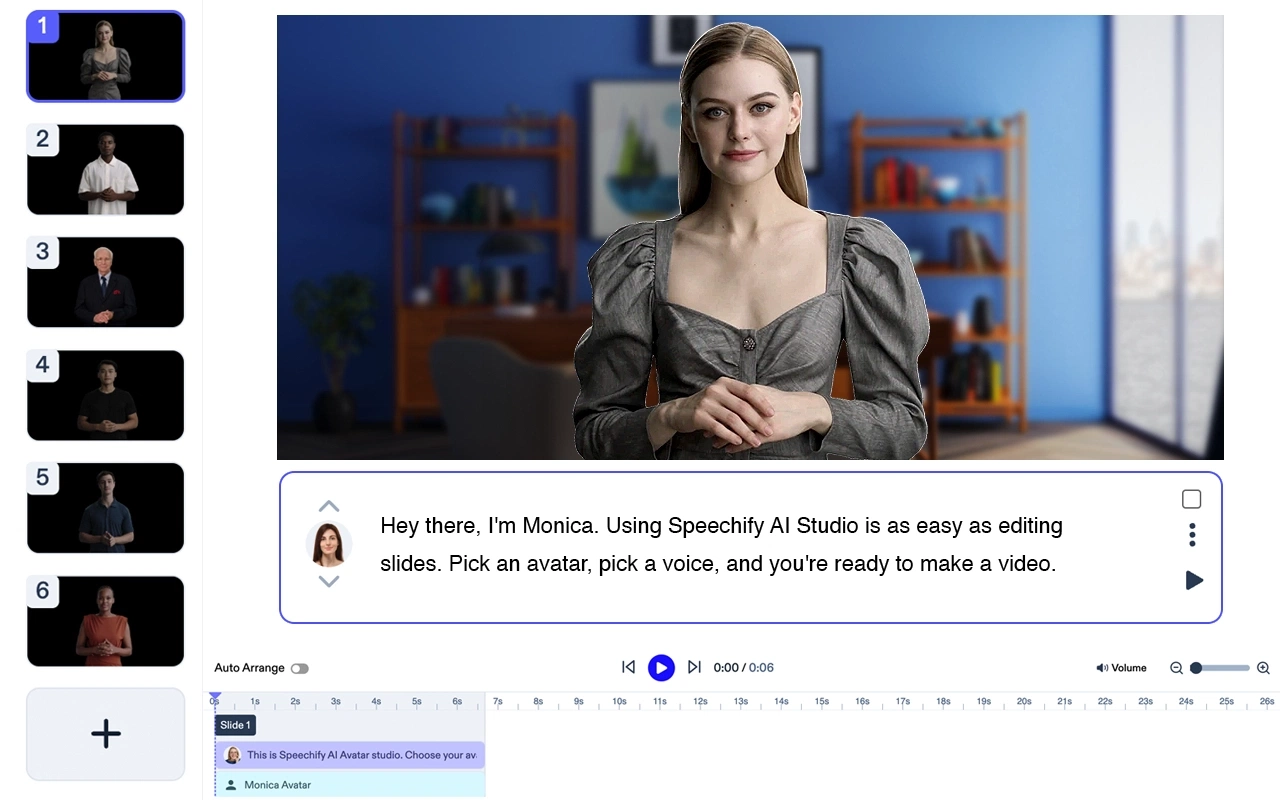
Speechify Studio je sveobuhvatan kreativni AI paket za pojedince i timove. Izradite impresivne AI videe iz tekstualnih uputa, dodajte naraciju, glazbu i besplatne slike. Svi vaši projekti besplatni su za osobnu ili komercijalnu upotrebu.
Najbolje značajke: predlošci, tekst u video, uređivanje uživo, promjena veličine, transkripcija, alati za video marketing.
Speechify je najbolji izbor za izradu avatar videa. Odličan je sam za sebe, a nudi i integraciju s cijelim Speechify Studio AI paketom. Idealan je za timove svih veličina.
Adobe Premiere Pro

Profesionalni program za obradu videa s naprednim opcijama za izradu vrhunskih videa.
Cijena: od 20,99 $/mj
Top 5 značajki:
- Opsežni alati za uređivanje
- Mnogobrojni video predlošci
- Integracija s Adobe Creative Cloudom
- Napredne opcije za boje
- Podrška za VR i 360° video
Filmora

Jednostavan editor videa s puno kreativnih mogućnosti.
Cijena: od 7,99 $/mj
Top 5 značajki:
- Intuitivno sučelje za povlačenje
- Mnoštvo prijelaza i efekata
- Podrška za 4K
- Alati za audio obradu
- Baza glazbe bez naknade
iMovie

Besplatan editor videa za Mac i iOS, idealan za početnike.
Cijena: besplatan za Apple uređaje
Top 5 značajki:
- Jednostavno sučelje
- Unaprijed učitana glazba
- Integracija s Apple uređajima
- 4K podrška
- Animirani tekst i naslovi
InShot

Mobilna aplikacija za obradu videa s raznim opcijama za brzo i lako stvaranje videa.
Cijena: besplatno uz nadoplate
Top 5 značajki:
- Jednostavno sučelje
- Filteri i efekti
- Audio alati
- Podesiva brzina videa
- Biblioteka naljepnica i emojija
Magisto
AI editor videa koji vam olakšava stvaranje sadržaja.
Cijena: od 4,99 $/mj
Top 5 značajki:
- AI uređivanje
- Video predlošci
- Baza licencirane glazbe
- Integracija s društvenim mrežama
- Analitika za poslovne korisnike
Animoto
Online alat za video od fotografija s mnoštvom predložaka za izradu slideshow videa.
Cijena: od 8 $/mj
Top 5 značajki:
- Jednostavno sučelje
- Mnoštvo slideshow predložaka
- Biblioteka licencirane glazbe
- HD kvaliteta videa
- Integracija s društvenim mrežama
KineMaster

Moćan mobilni editor videa za Android i iOS uređaje.
Cijena: besplatno uz nadoplate
Top 5 značajki:
- Montaža na više slojeva
- 4K podrška
- Puno prijelaza i efekata
- Audio alati
- Više audio zapisa
PowerDirector

Svestran editor videa s naprednim mogućnostima za Windows i Android.
Cijena: od 4,33 $/mj
Top 5 značajki:
- Podrška za 4K
- Efekti i predlošci
- Vremenska crta s više zapisa
- Praćenje pokreta
- Audio alati
Quik by GoPro
Besplatan mobilni editor, jednostavan za brzu izradu videa u pokretu.
Cijena: besplatno
Top 5 značajki:
- Automatska izrada videa
- Više video predložaka
- Povezivanje s GoPro kamerama
- HD podrška za video
- Biblioteka glazbe s licencom
Najčešća pitanja
Koji je najbolji alat za video od fotografija?
Adobe Premiere Pro smatra se jednim od najboljih alata za izradu videa od fotografija zbog svojih naprednih mogućnosti.
Koja je najbolja aplikacija za besplatnu izradu videa od slika?
iMovie je odličan besplatan izbor za izradu videa od fotografija, posebno za korisnike Apple uređaja.
Koja web stranica izrađuje video od slika?
Animoto je popularna web stranica za izradu videa od slika uz razne predloške i mogućnosti.



