

No mundo da criação de conteúdo, adicionar um toque pessoal aos seus vídeos pode fazer toda a diferença. É aí que um criador de vídeos com narração se destaca, oferecendo a você as ferramentas para produzir vídeos envolventes e profissionais, com sua própria voz ou com áudio de narração profissional.
O que é um Criador de Vídeo com Narração?
Um criador de vídeo com narração é uma ferramenta que permite adicionar áudio narrado ao seu conteúdo em vídeo. Essa funcionalidade é essencial para diversas finalidades de edição de vídeo, como tutoriais, vídeos explicativos e muito mais. Com um criador de vídeo com narração, você pode gravar sua própria voz, usar vozes de IA em diferentes idiomas como inglês ou espanhol, ou até mesmo fazer upload de arquivos de áudio pré-gravados para dar um toque mais pessoal ou profissional aos seus clipes de vídeo.
Top 10 Usos de um Criador de Vídeo com Narração:
- Vídeos Explicativos: Crie vídeos explicativos fáceis de entender, com narração que descomplica tópicos ou produtos complexos.
- Tutoriais: Grave tutoriais passo a passo com sua própria voz guiando o espectador em cada etapa.
- Vídeos para YouTube: Deixe seu conteúdo para o YouTube mais profissional com narrações de alta qualidade que criam conexão com seu público.
- Podcasts: Adicione vídeo aos seus episódios de podcast com a narração correspondente.
- Clipes para Redes Sociais: Crie clipes chamativos para redes sociais com narração para prender a atenção do seu público.
- Vídeos de Animação: Adicione narração aos seus vídeos de animação para dar vida aos personagens.
- Apresentações em Vídeo: Deixe suas apresentações profissionais mais claras com uma narração explicando seus pontos.
- Vídeos para TikTok: Acrescente sua própria narração ou voz profissional aos seus vídeos do TikTok para se destacar.
- Demonstrações de Produtos: Mostre, na prática, como o seu produto funciona com um vídeo narrado.
- Depoimentos: Dê um toque ainda mais pessoal aos depoimentos de clientes com áudio narrado.
Como Criar um Vídeo com Narração:
- Escolha um criador de vídeo com narração e importe seu arquivo de vídeo.
- Comece a gravar sua voz ou faça upload de um arquivo de áudio.
- Edite seu vídeo e o áudio da narração, adicionando transições, trilha de fundo e efeitos sonoros.
- Salve e exporte seu vídeo no formato desejado.
- Compartilhe seu vídeo narrado nas redes sociais ou na plataforma de sua preferência.
Como Criar um Vídeo com Narração Gratuito:
Existem vários editores de vídeo gratuitos online que permitem adicionar narração aos seus vídeos. Algumas dessas ferramentas oferecem apenas funções básicas, enquanto outras contam com recursos avançados como texto para fala, legendas e muito mais. Veja o passo a passo para criar um vídeo com narração sem gastar nada:
- Encontre um editor de vídeo online gratuito que ofereça funcionalidade de narração.
- Importe seus clipes de vídeo e comece a montar seu vídeo.
- Grave sua narração ou utilize a ferramenta de texto para fala para gerar o áudio.
- Edite seu vídeo e a narração conforme achar necessário.
- Salve e compartilhe seu conteúdo em vídeo.
Como Adicionar Narração a um Vídeo no iPhone:
- Abra o aplicativo iMovie no seu iPhone.
- Importe o arquivo de vídeo ao qual deseja adicionar narração.
- Toque no clipe de vídeo na linha do tempo e selecione ‘Narração’.
- Comece a gravar sua narração e toque em ‘Parar’ quando terminar.
- Salve e exporte seu vídeo com a narração adicionada.
Como Adicionar Narração a um Vídeo no Android:
- Baixe e instale um aplicativo de edição de vídeo que tenha suporte a narração.
- Importe o arquivo de vídeo ao qual deseja adicionar narração.
- Toque no clipe de vídeo na linha do tempo e selecione ‘Narração’.
- Comece a gravar sua narração e toque em ‘Parar’ quando terminar.
- Salve e exporte seu vídeo com a narração adicionada.
Como Adicionar Narração ao Seu Vídeo para Iniciantes:
Adicionar narração ao seu vídeo pode parecer difícil para quem está começando, mas com as ferramentas e etapas certas, é um processo simples:
- Escolha um criador de vídeo com narração fácil de usar.
- Importe seu arquivo de vídeo e familiarize-se com a interface do editor.
- Grave sua narração ou faça upload de um arquivo de áudio pré-gravado.
- Sincronize o áudio da narração com o vídeo, garantindo que acompanhe o que acontece na tela.
- Edite seu vídeo adicionando trilha de fundo, efeitos sonoros e transições para valorizar o conteúdo.
Os 10 Melhores Criadores de Vídeo com Narração
Speechify Voiceover
Custo: Gratuito para testar
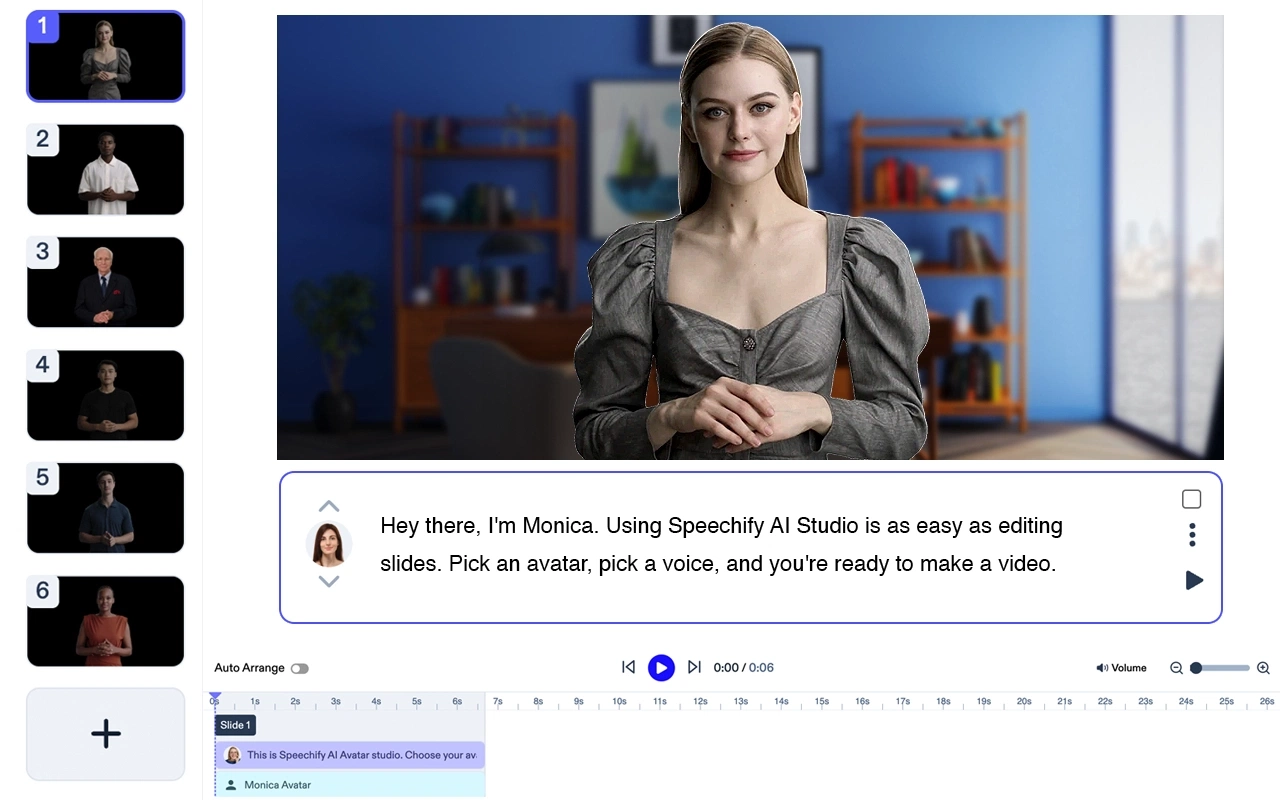
Speechify é o Gerador de Narração por IA #1 do mercado. Usar o Speechify Voice Over Generator é muito simples. Em poucos minutos você consegue transformar qualquer texto em narração com som natural. Experimente nossa voz de IA hoje mesmo, de graça!
- Digite o texto que você quer ouvir falado
- Selecione uma voz e a velocidade de reprodução
- Clique em “Gerar”. Pronto!
iMovie

Crie vídeos com aparência profissional e narração no Mac e no iPhone.
Custo: Gratuito
Top 5 Funções:
- Interface amigável
- Ampla variedade de modelos
- Transições de alta qualidade
- Opções de trilha de fundo
- Funcionalidade de texto para fala
Filmora

Um software de edição de vídeo completo para Windows e Mac, com recursos para narração.
Custos: (A partir de US$ 39,99/ano)
Top 5 Funções:
- Interface intuitiva de arrastar e soltar
- Grande biblioteca de efeitos sonoros
- Opções de trilha de fundo
- Texto para fala
- Suporte a vídeos 4K
Adobe Premiere Pro
Editor de vídeo profissional com recursos avançados de narração e gravação de áudio.
Custo: A partir de US$ 20,99/mês
Top 5 Funções:
- Ferramentas robustas de edição
- Aprimoramento de áudio com IA
- Suporte multilíngue
- Edição de VR
- Recursos de edição 3D
Camtasia

Ideal para criar tutoriais e vídeos educativos com narração.
Custo: A partir de US$ 299,99 (licença perpétua)
Top 5 Funções:
- Gravação de tela
- Modelos de vídeo integrados
- Animações
- Opções de voz por IA
- Quizzes interativos
InShot

Editor de vídeo mobile para Android e iPhone com recursos de narração.
Custo: Gratuito com compras no app
Top 5 Funções:
- Interface fácil de usar
- Variedade de filtros e efeitos
- Controle de velocidade
- Opções de trilha de fundo
- Adição de textos e figurinhas
KineMaster

Editor de vídeo versátil para Android e iPhone, perfeito para adicionar narração a clipes de redes sociais.
Custo: Gratuito com compras no app
Top 5 Funções:
- Linha do tempo com múltiplas camadas
- Controle de velocidade
- Chroma key
- Opções de exportação em alta qualidade
- Loja de ativos extensa.
Animaker

Criador de vídeo animado com recursos de narração para vídeos explicativos e animações.
Custo: Gratuito com planos de assinatura a partir de US$ 20/mês
Top 5 Funções:
- Interface de arrastar e soltar fácil de usar
- Ampla biblioteca de personagens e fundos prontos
- Funcionalidade de texto para fala
- Suporte multilíngue
- Opções de exportação em alta qualidade
Lumen5

Editor de vídeo online com narração por IA e recursos de texto para fala.
Custo: Gratuito com planos de assinatura a partir de US$ 19/mês
Top 5 Funções:
- Criação de vídeo com IA
- Ampla variedade de modelos
- Opções de marca personalizadas
- Imagens de banco de alta qualidade
- Integração com redes sociais
VSDC Free Video Editor

Um editor de vídeo gratuito para Windows com funcionalidade de narração.
Custo: Gratuito
Top 5 Funções:
- Interface de edição não linear
- Grande variedade de efeitos de vídeo
- Correção de cor
- Ferramentas de edição de áudio
- Suporte a vídeos 4K
Perguntas Frequentes
iMovie e InShot são aplicativos populares que permitem criar vídeos com narração.
Lumen5 e Animaker oferecem funcionalidades de texto para fala para criar narração em áudio.
Adobe Premiere Pro e Filmora são programas profissionais que oferecem ferramentas para criar vídeos com narração.




