

Šiandienos skaitmeniniame amžiuje žmonės nuolat ieško naujų būdų išsaugoti ir branginti savo akimirkas. Vienas puikus įrankis, pakeitęs tai, kaip laikome prisiminimus, yra Nuotraukų ir vaizdo įrašų kūrėjas. Jis lengvai sujungia nuotraukas ir vaizdo įrašus ir leidžia kurti įtraukiančias istorijas.
Kas yra Nuotraukų ir vaizdo įrašų kūrėjas?
Nuotraukų ir vaizdo įrašų kūrėjas – tai vaizdo redagavimo programa, kuri sujungia nuotraukas, muziką ir animacijas, kad galėtumėte kurti įspūdingus vaizdo įrašus. Su įvairiais redagavimo įrankiais lengvai pridėsite perėjimus, šablonus, lipdukus ir daugiau – patogu net pradedantiesiems, o rezultatas atrodo profesionaliai.
10 pagrindinių Nuotraukų ir vaizdo įrašų kūrėjo naudojimo būdų
- Socialinių tinklų įrašai:Kurkite išsiskiriančius įrašus derindami nuotraukas, muziką ir animacijas.
- Gimtadienio skaidrės:Paverskite gražias gimtadienio akimirkas skaidrių filmuku su muzika ir animacijomis.
- Vestuvių vaizdo įrašai:Sujunkite vestuvių nuotraukas ir vaizdo klipus ir sukurkite ypatingą filmuką.
- Kelionių vlogai:Sudėkite savo nuotraukas ir kelionių klipus su fono muzika ir gaukite įtraukiantį vlogą.
- Verslo pristatymai:Kurkite profesionalius pristatymus derindami nuotraukas, klipus ir animacijas.
- Muzikiniai klipai:Kurkite muzikinius vaizdo įrašus naudodami savo nuotraukas ir klipus.
- Mokomieji pamokų filmukai:Derinkite nuotraukas, vaizdo klipus ir pasakojimą – kurkite edukacinius filmukus.
- Reklaminiai vaizdo klipai:Kurkite reklaminius vaizdo įrašus iš nuotraukų, klipų ir animacijų.
- Šventiniai sveikinimai:Siųskite asmeninius sveikinimus, kurdami vaizdo įrašus iš nuotraukų ir muzikos.
- Personalizuotos dovanos:Kurkit dovanų filmukus sudėję artimųjų nuotraukas ir klipus.
Kaip sukurti vaizdo įrašą iš nuotraukų?
- Pasirinkite nuotraukas:Atsirinkite nuotraukas, kurias norite naudoti.
- Įkelkite nuotraukas į kūrėją:Pasinaudokite drag & drop funkcija ir įkelkite jas į programą.
- Pridėkite perėjimus ir animacijas:Išsirinkite perėjimus ir animacijas, kad vaizdo įrašas atgytų.
- Pridėkite muziką ar įgarsinimą:Papuoškite įrašą fone skambančia muzika ar savo įgarsinimu.
- Išsaugokite ir dalinkitės:Išsaugokite vaizdo įrašą ir pasidalykite juo socialiniuose tinkluose ar su artimaisiais.
Kas yra paprastas nuotraukų ir muzikos vaizdo įrašų kūrėjas?
Paprastas vaizdo įrašų kūrėjas iš nuotraukų ir muzikos – tai įrankis pradedantiesiems: paprastas drag-and-drop valdymas, daugybė muzikos takelių, galimybė pridėti savo muziką, šriftus, uždangas – kurkite išskirtinius vaizdo įrašus be vargo.
Ar yra nemokamų nuotraukų ir muzikos vaizdo kūrėjų?
Taip, internete rasite daugybę nemokamų kūrėjų, kurie leidžia iš nuotraukų ir muzikos kurti vaizdo įrašus. Dažniausiai jie turi tik bazines redagavimo funkcijas ir galutiniame vaizdo įraše gali pridėti vandens ženklus.
Kaip uždirbti su Nuotraukų ir vaizdo įrašų kūrėju?
- Kurti ir parduoti individualius vaizdo įrašus:Siūlykite paslaugą ir kurkite asmeninius filmukus gimtadieniams, vestuvėms ar kitoms progoms.
- Siūlykite vaizdo redagavimo paslaugas:Redaguokite klientų vaizdo įrašus – tiek verslui, tiek asmeniniams poreikiams.
- Kurti akcijų vaizdo įrašus:Kurkit akcijų klipus ir pardavinėkite juos platformose kaip Shutterstock ar Adobe Stock.
- Kurkite internetinius mokymus:Ruoškite ir pardavinėkite pamokas apie šio įrankio naudojimą.
- Kurti turinį socialiniams tinklams:Kurkite vaizdo turinį socialiniams tinklams ir uždirbkite iš reklamų ar rėmimo.
10 geriausių Nuotraukų ir vaizdo įrašų kūrėjų
Speechify Studio
Kaina: Galima bandyti nemokamai
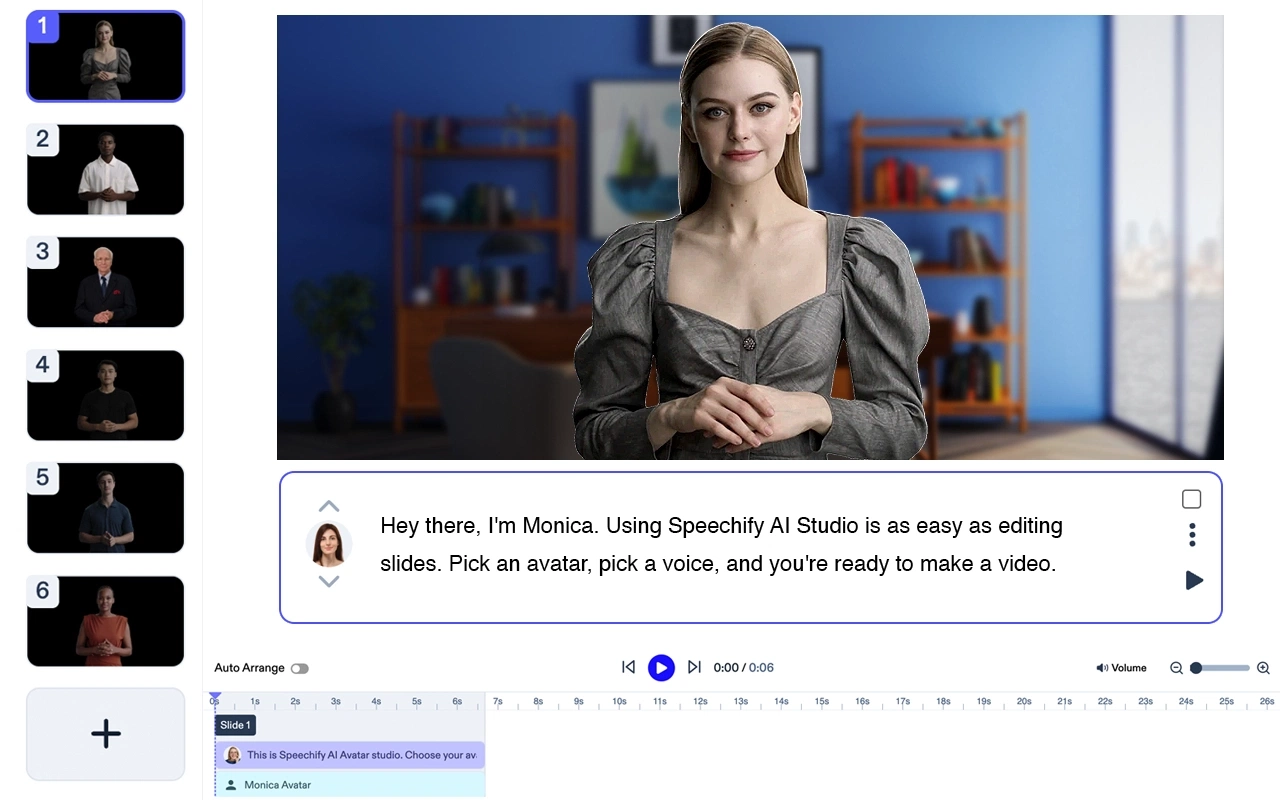
Speechify Studio – išsamus kūrybinių AI priemonių rinkinys asmenims ir komandoms. Kurkite įspūdingus AI vaizdo klipus iš tekstų, pridėkite įgarsinimus, muziką, nemokamas nuotraukas. Visi projektai tinkami nemokamai tiek asmeniniam, tiek komerciniam naudojimui.
Pagrindinės funkcijos: Šablonai, tekstas į vaizdą, redagavimas realiu laiku, dydžio keitimas, transkripcija, rinkodaros įrankiai.
Speechify – geriausias pasirinkimas avatarų vaizdo įrašų kūrimui. Tai puikus produktas, kuris sklandžiai veikia su kitomis Speechify AI kūrėjų priemonėmis. Tinka bet kokio dydžio komandoms.
Adobe Premiere Pro
Profesionalus vaizdo įrašų redaktorius, siūlantis pažangias funkcijas aukštos kokybės vaizdo įrašams kurti.
Kaina: nuo $20.99/mėn.
Top 5 funkcijos:
- Platus redagavimo įrankių pasirinkimas
- Daugybė vaizdo šablonų
- Integruota su Adobe Creative Cloud
- Pažangios spalvų korekcijos
- VR ir 360° vaizdo palaikymas
Filmora

Patogus vaizdo redaktorius su daugybe kūrybinių funkcijų.
Kaina: nuo $7.99/mėn.
Top 5 funkcijos:
- Intuityvi drag-and-drop sąsaja
- Įvairūs perėjimai ir efektai
- 4K raiškos palaikymas
- Garso redagavimo įrankiai
- Neribota muzikos biblioteka
iMovie

Nemokama vaizdo redagavimo programa Mac ir iOS naudotojams – puikiai tinka pradedantiesiems.
Kaina: Nemokama Apple įrenginiams
Top 5 funkcijos:
- Paprasta sąsaja
- Įkelta muzika
- Apple įrenginių integracija
- 4K raiškos palaikymas
- Animuoti tekstai ir titrai
InShot

Mobilioji vaizdo redagavimo programėlė su daug funkcijų greitam įrašų kūrimui.
Kaina: Nemokama su pirkimais programėlėje
Top 5 funkcijos:
- Patogi sąsaja
- Įvairūs filtrai ir efektai
- Garso redagavimo įrankiai
- Vaizdo greičio reguliavimas
- Lipdukų ir emoji biblioteka
Magisto
AI pagrįstas vaizdo redaktorius – vaizdo kūrimas tampa dar paprastesnis.
Kaina: nuo $4.99/mėn.
Top 5 funkcijos:
- AI redagavimo įrankiai
- Įvairūs šablonai
- Licencijuota muzikos biblioteka
- Integracija su socialiniais tinklais
- Analitika verslui
Animoto
Internetinis nuotraukų ir vaizdo įrašų kūrėjas su įvairiais šablonais ir galimybėmis kurti skaidrių filmukus.
Kaina: nuo $8/mėn.
Top 5 funkcijos:
- Patogi sąsaja
- Daug skaidrių šablonų
- Licencijuota muzikos biblioteka
- HD kokybė
- Integracija su socialiniais tinklais
KineMaster

Galingas mobilus redaktorius Android ir iOS įrenginiams.
Kaina: Nemokama su pirkimais programėlėje
Top 5 funkcijos:
- Daugiapakopis redagavimas
- 4K vaizdo palaikymas
- Daugybė perėjimų ir efektų
- Garso redagavimo funkcijos
- Kelios garso takelių linijos
PowerDirector

Universalus vaizdo redaktorius su pažangiomis funkcijomis Windows ir Android naudotojams.
Kaina: nuo $4.33/mėn.
Top 5 funkcijos:
- 4K raiškos palaikymas
- Daugybė šablonų ir efektų
- Daugiatakė laiko juosta
- Judesių sekimas
- Garso redaktorius
Quik by GoPro
Nemokamas mobiliųjų vaizdo įrašų redaktorius greitam ir paprastam kūrimui.
Kaina: Nemokama
Top 5 funkcijos:
- Automatinis vaizdo kūrimas
- Daugybė vaizdo šablonų
- Integracija su GoPro kamera
- HD vaizdo kokybė
- Licencijuota muzikos biblioteka
DUK
Kurį nuotraukų ir vaizdo kūrėją rinktis?
Adobe Premiere Pro laikoma vienu geriausių variantų dėl itin plačių ir pažangių galimybių.
Kuri programa geriausia vaizdo įrašams iš nuotraukų nemokamai?
iMovie – puikus nemokamas pasirinkimas, ypač Apple įrenginių naudotojams.
Kuri svetainė kuria vaizdo įrašus iš nuotraukų?
Animoto – populiari svetainė vaizdo įrašams iš nuotraukų kurti su įvairiais šablonais ir funkcijomis.




