

Na era da interação digital, criar avatares falantes se tornou cada vez mais comum. Utilizando tecnologia de IA, criadores podem desenvolver um avatar personalizado que imita movimentos humanos reais e expressões faciais, incluindo uma boca falante. Este artigo vai guiar iniciantes na criação de avatares falantes animados e de alta qualidade gratuitamente, apresentando diferentes aplicativos e softwares de IA gratuitos.
Como Criar um Avatar que Fale?
Criar um avatar falante geralmente envolve as seguintes etapas:
- Selecione um Modelo: Comece escolhendo um modelo de avatar na biblioteca do software de sua escolha. Muitas plataformas oferecem uma grande variedade de modelos para atender a diferentes necessidades.
- Personalize o Avatar: Depois de selecionar o modelo, personalize seu avatar. Isso pode envolver mudar o cabelo, cor da pele, roupas, acessórios e muito mais.
- Adicione Narração ou Texto-para-Fala: Em seguida, adicione uma narração ao seu avatar. Isso pode ser feito gravando sua voz, usando uma narração pré-gravada ou recorrendo à tecnologia de texto-para-fala.
- Sincronize os Movimentos Labiais do Avatar: Sincronize os movimentos labiais do avatar com a narração para criar um efeito realista de sincronia labial. Algumas plataformas utilizam inteligência artificial para automatizar esse processo.
- Anime o Avatar: Acrescente movimentos e expressões faciais ao seu avatar para deixá-lo mais envolvente. Isso pode ser feito manualmente ou com ferramentas de IA.
- Exporte Seu Vídeo: Quando estiver satisfeito com o resultado, exporte o vídeo em um formato adequado para o uso desejado, como redes sociais ou e-learning.
Apps e Softwares para Criar Avatares Falantes
Existem inúmeros aplicativos que podem te ajudar a criar um avatar falante. Confira as 8 melhores opções:
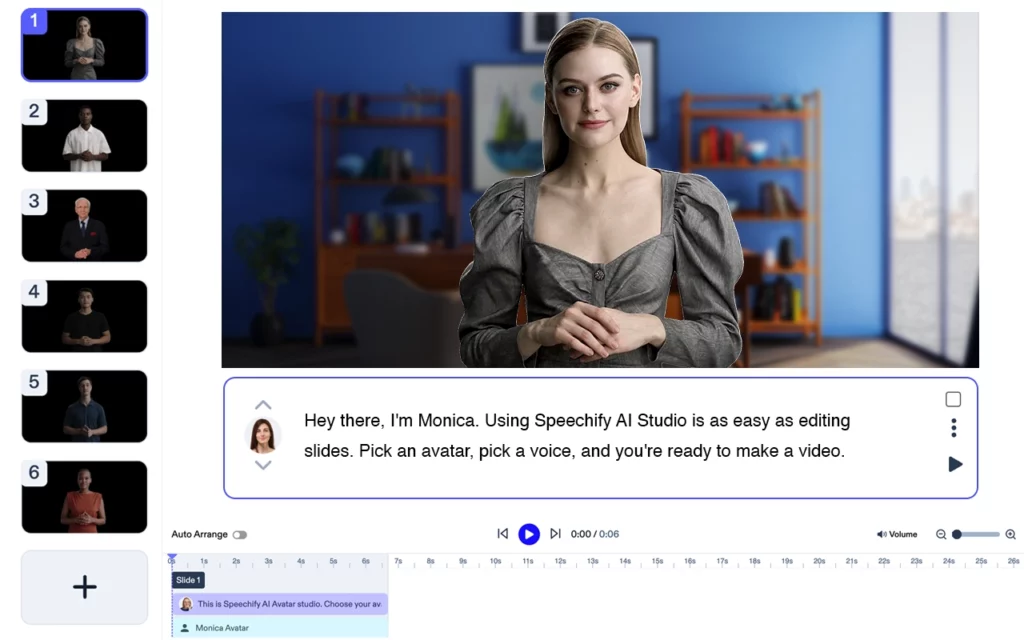
Speechify Video: Speechify Video é o principal criador de vídeos com avatares falantes. Basta fazer upload do seu roteiro e escolher o seu avatar para criar vídeos incríveis e envolventes em poucos minutos.

Voki: Voki é um popular aplicativo gratuito de avatar falante que permite aos usuários criar avatares personalizados para educação ou negócios.

SitePal: O SitePal oferece uma grande variedade de personagens personalizáveis e opções de texto-para-fala. Embora não seja totalmente gratuito, eles oferecem um teste grátis de 15 dias.

Adobe Character Animator: Este software da Adobe é uma poderosa ferramenta para criar e animar personagens usando sua webcam, que captura suas expressões faciais em tempo real.
Synthesia: Synthesia é uma plataforma de geração de vídeos por IA que converte texto em vídeo, sendo uma ótima ferramenta para criar vídeos explicativos ou tutoriais.
D-ID: Esta plataforma usa IA para criar avatares falantes de alta qualidade a partir de uma única foto. No entanto, é mais indicada para usos profissionais devido ao seu preço.
CrazyTalk: O CrazyTalk é especializado na criação de rostos falantes animados. Ele oferece ferramentas intuitivas para iniciantes e recursos avançados para profissionais.

ChatGPT: Embora não tenha sido criado especificamente para gerar avatares, o ChatGPT da OpenAI pode alimentar os diálogos do seu avatar com textos envolventes gerados por IA.
PowerPoint: Com um pouco de criatividade, você pode até usar o PowerPoint para criar avatares falantes simples, aproveitando seus recursos de animação e transição.
Usando Avatares Falantes de Forma Eficiente
Agora que você tem seu avatar falante, é importante usá-lo de maneira eficiente. Prenda a atenção do público com expressões faciais dinâmicas, movimentos animados e uma narração com voz natural. Não se esqueça de utilizar ferramentas de gravação de tela para registrar suas interações com avatares de IA em tempo real.
Lembre-se: apesar de criar vídeos envolventes com um avatar falante parecer complexo, com as ferramentas certas e um pouco de prática, o processo se torna leve, divertido e muito criativo.
Por fim, continue explorando novas ferramentas de IA e atualizações dos softwares listados aqui. O mundo dos avatares de IA está em constante evolução, e sempre há algo novo para aprender! Então, vá em frente, crie seu vídeo de avatar e deixe sua marca nesta era digital!
Criar um avatar que possa falar e interagir com outras pessoas nunca foi tão fácil com o surgimento de vários aplicativos e ferramentas. Veja como você pode fazer isso:
Qual é o Aplicativo em que Você Pode Criar um Avatar e Conversar com Pessoas?
Voki é um aplicativo fantástico em que você pode criar um avatar e conversar com pessoas. É especialmente popular em ambientes educativos, permitindo que professores criem avatares para envolver alunos de forma única e interativa.
Qual é o App de Avatar Falante Gratuito?
Um ótimo exemplo de app gratuito de avatar falante é o My Talking Avatar Free. Este aplicativo permite que você crie seu avatar a partir de várias opções e depois o anime com uma grande variedade de ações e movimentos. Ele inclui um recurso de texto-para-fala, permitindo que seu avatar diga exatamente o que você escrever.
Como Criar um Avatar de IA Falante Gratuitamente?
Criar um avatar de IA falante gratuitamente pode ser feito com o aplicativo SitePal. Embora a versão completa seja paga, o SitePal oferece um período de teste gratuito em que você pode aproveitar as funcionalidades para criar um avatar com IA. Veja um guia rápido:
- Escolha um design de avatar entre os modelos disponíveis.
- Personalize o design para ficar do jeito que você imaginou.
- Use a função de texto-para-fala para dar voz ao seu avatar.
- Ajuste as configurações de sincronia labial para acompanhar a fala.
- Incorpore o avatar na plataforma desejada.
Como Criar um Avatar Interativo?
Para criar um avatar interativo, você pode considerar o uso de uma ferramenta mais avançada, como o Adobe Character Animator. Ele utiliza sua webcam e microfone para animar o avatar em tempo real com base nos seus movimentos e na sua fala. Isso resulta em um avatar muito mais dinâmico e envolvente do que aqueles que usam apenas animações pré-definidas.
Como Criar um Avatar com Boca Falante?
Fazer um avatar com boca falante envolve criar o avatar, adicionar uma narração ou usar a função de texto-para-fala e, em seguida, sincronizar os movimentos da boca do avatar com a fala. Isso é frequentemente chamado de sincronia labial. Ferramentas como CrazyTalk se destacam nessa área, oferecendo funções que combinam automaticamente os movimentos labiais do avatar com o áudio, resultando em uma animação de fala bem natural.




