



Herhangi bir basılı metni dinlenebilir bir belgeye dönüştürün
Fiziksel kitabınızdaki herhangi bir metni dinleyin
Bir fiziksel kitabı taramak için tek tek veya birden fazla sayfanın fotoğrafını çekip bunları tek bir dinlenebilir belge olarak yükleyebilirsiniz. Bir kitabı ya da uzun bir basılı belgeyi dinlemek için idealdir.
- İyi bir aydınlatma sağlayın, uygulamayı açın ve ➕ simgesine dokunun.
- Menüden Sayfaları Tara seçeneğini seçin.
- Taranacak metnin bulunduğu sayfaya telefon kamerasını yöneltin. Tüm metnin çerçevenin içinde olduğundan emin olun.
- Fotoğraf çekmek için alttaki dairesel düğmeye dokunun. Daha fazla sayfa taramak için aynı adımı tekrarlayın.
- İşiniz bittiğinde, ekranın sağ alt köşesindeki ok simgesine > dokunun.
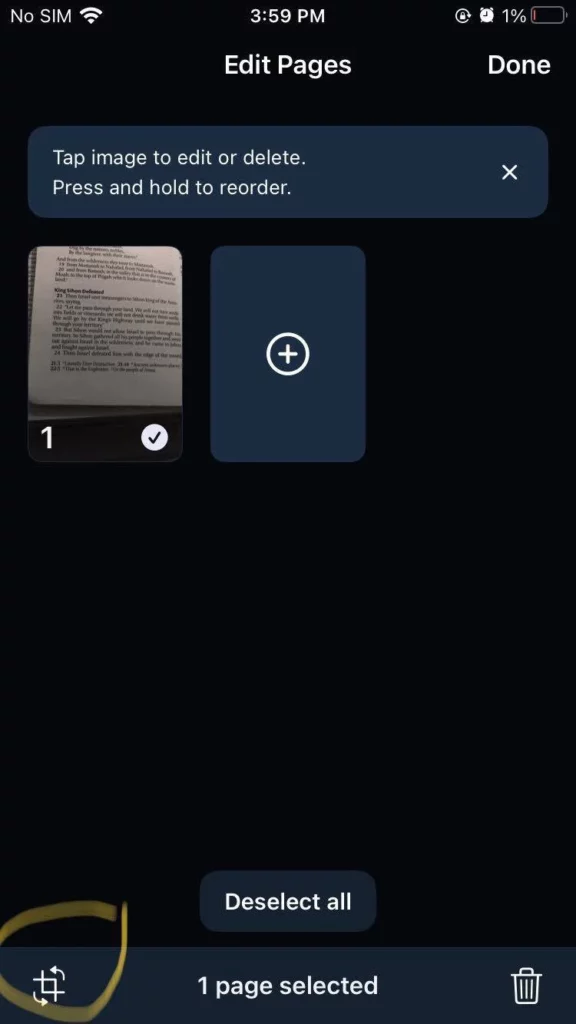
- Bu ekranda taramalarınızı kırpabilir, silebilir veya yeniden sıralayabilirsiniz.
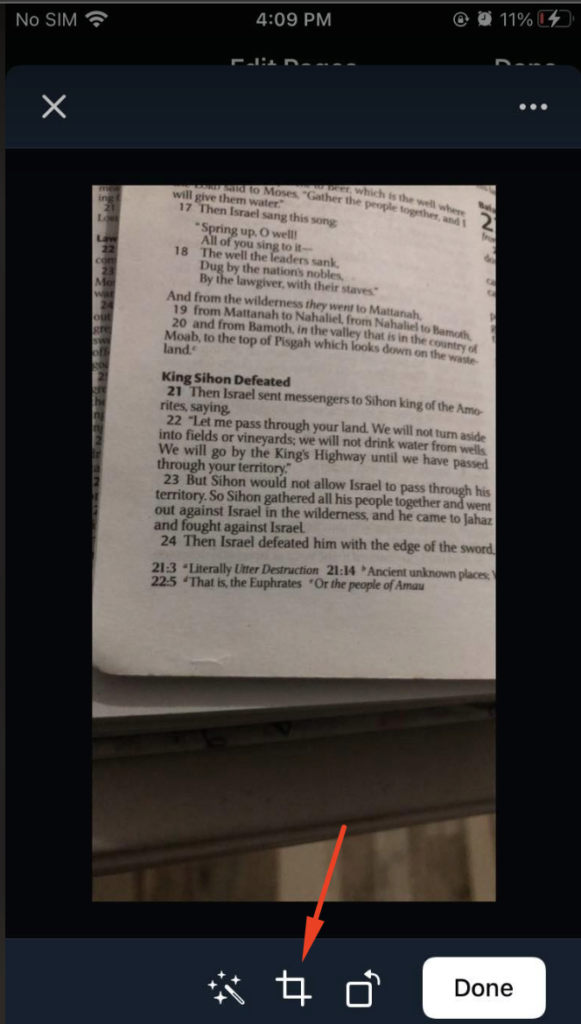
- Fotoğrafları kırpmak için tarama küçük resminin sol alt köşesindeki kırpma simgesine dokunun. Metnin dinlenebilir belgede doğru işlenmesi için her fotoğrafı metne olabildiğince yakın kırpmanızı öneririz. Ardından Bitti seçeneğine dokunun.
- Fotoğrafları yeniden sıralamak için, yerini değiştirmek istediğiniz tarama küçük resmine basılı tutun ve doğru konuma sürükleyin.
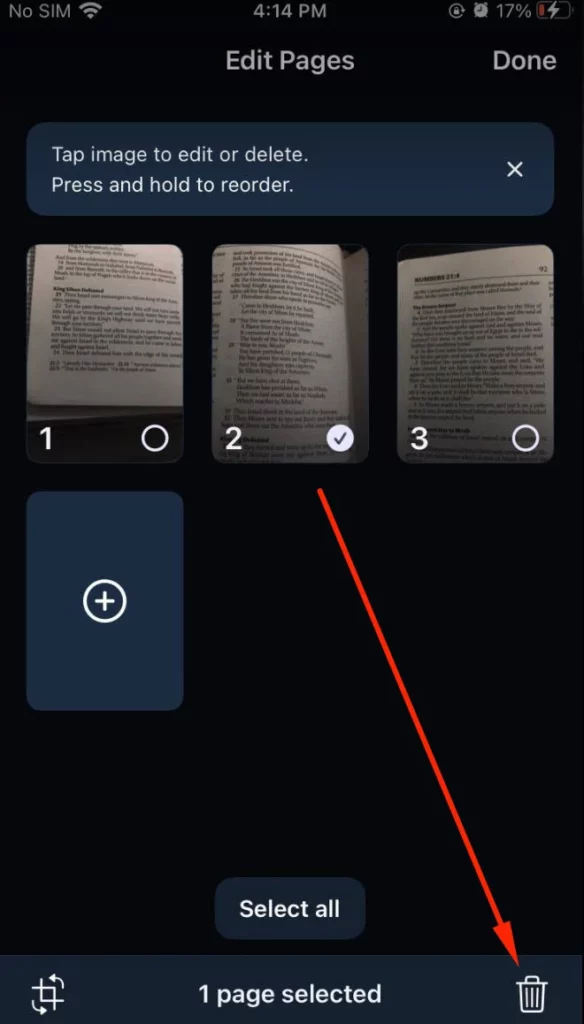
- Bir fotoğrafı silmek için ilgili tarama küçük resmini seçin ve sayfanın sağ alt köşesindeki sil simgesine dokunun.
7. Taramaları kütüphanenizde tek bir dinlenebilir belge olarak kaydetmek için Bitti seçeneğine dokunun.
Film rulonuzdaki bir fotoğrafta yer alan herhangi bir metni dinleyin
Ekran görüntüsü ya da telefon kamerasıyla çekilmiş basılı metin fotoğraflarındaki metni dinlemek için idealdir.
- Uygulamada ➕ simgesine dokunun ve Sayfaları Tara seçeneğini seçin.
- Fotoğraflar sekmesine sol alttan dokunun.
- Speechify'ın film rulonuza erişmesine izin verin, eğer daha önce izin vermediyseniz. Daha önce bu izin ekranını kapattıysanız, telefon ayarlarından izin verebilirsiniz. Şuraya gidin: Ayarlar > Speechify > Fotoğraflar bölümünden Tüm Fotoğraflar seçeneğini işaretleyip Speechify'ın fotoğraflarınıza erişmesine izin verin, ardından tekrar uygulamaya dönün.
- Dinlemek istediğiniz fotoğrafları film rulonuzdan seçin.
- Sağ alt köşedeki ok simgesine > dokunun.
- Artık dinlenebilir belgeye eklemek istediğiniz diğer sayfaların fotoğraflarını da çekebilirsiniz. Bunun için alttaki ➕ simgesine dokunup Kamera seçeneğini işaretleyin ya da işiniz bittiyse sağ alt köşedeki ok simgesine > dokunarak düzenleme ekranına geçin.
- Burada taramalarınızı kırpabilir, silebilir ya da yeniden sıralayabilirsiniz. Bu adımlar, yukarıdaki "Fiziksel kitabınızdaki herhangi bir metni dinleyin" bölümündeki 6. maddeyle aynıdır.
- Taramaları kütüphanenizde tek bir dinlenebilir belge olarak kaydetmek için Bitti seçeneğine dokunun.




