

PPT u video konverter
PowerPoint prezentacije (PPT) i dalje su jedan od najpopularnijih alata za izradu poslovnih projekata ili školskih zadataka. Ako nakon izrade svoje prezentacije želite je pretvoriti u video za blog ili YouTube, sigurno tražite najjednostavniji i najbolji način.
U nastavku saznajte kako PPT prezentaciju pretvoriti u kvalitetan video.
Koje aplikacije možete koristiti za izradu PowerPoint prezentacija i slajdova?
Evo najpopularnijih aplikacija za izradu i poboljšavanje PowerPoint prezentacija i slajdova. Neke su na tržištu godinama, druge su novije. Sve nude slične mogućnosti kao PowerPoint, uz izbor gotovih predložaka i uređivanje prezentacije uz dodatne funkcije.
Najpoznatije PowerPoint i slideshow aplikacije:
- PowerPoint 2007
- Microsoft Office
- PowerPoint Slides
- Canva
- Beautiful.ai
- Pitch
- Soho Show
Aplikacije za pretvaranje PPT-a u video
Ako želite pretvoriti PPT-ove i slajdove u video, na raspolaganju vam je više internetskih aplikacija. U nastavku provjerite koji su najbolji alati i kako ih koristiti.
HourOne

HourOne je jednostavna aplikacija kojom stvarate video iz PPT-a i slajdova. Nudi virtualne ljudske avatare za profesionalan izgled prezentacije. Video možete prilagoditi jezikom, naglasakom i izgledom po potrebi.
Kad završite izradu videa, možete ga preuzeti na računalo u više formata, kao što su WMV, MOV i AVI. Kreirani video lako se dijeli na YouTubeu, društvenim mrežama i drugim platformama.
HourOne nudi besplatno probno razdoblje. Tada će video imati vodeni žig u kutu. Za napredne mogućnosti potrebno je kupiti premium verziju.
Spremi kao video pomoću Microsoft PowerPointa
Izravno iz PowerPointa možete spremiti prezentaciju kao video. Dostupne su razne kvalitete videa, od standardne do Ultra HD. Ovo je najjednostavnije rješenje.
Možete koristiti snimljeno vrijeme i naraciju te zadati trajanje prijelaza između slajdova. Za spremanje imate dvije opcije: MPEG-4 i Windows Media Video. Preporučuje se MPEG-4 jer ga podržava većina playera i Apple uređaja.
Aspose
Aspose omogućuje pretvorbu PowerPoint prezentacija u video. Podržane su verzije s ekstenzijama PPT, PPTX i PPSX.
Tijekom izrade video prezentacije birate trajanje prijelaza, a po želji možete dodati i zvuk. Možete koristiti ponuđene zvukove ili učitati vlastite datoteke.
Aspose nudi i dodatne mogućnosti: pretvaranje MP4 u WEBM, PDF-a u video, slika u video te PowerPoint u YouTube video.
Online-Convert

Online-Convert je internetska platforma na koju možete učitati svoje PPS ili PPT datoteke i automatski ih pretvoriti u MP4 video, ali i u druge video formate.
Tijekom konverzije platforma nudi različite alate za personalizaciju videa. Rezolucija videa automatski se odabire prema željenoj veličini datoteke.
Osim što služi kao konverter PPT-a u video, aplikacija nudi još opcija: konverter slika, generator hashtagova i pretvarač PDF u Word.
Online-Convert je besplatan s osnovnim funkcijama. Za puni pristup trebate članstvo kojim dobivate mogućnost konverzije, uređivanja i kompresije svih datoteka.
Veed.io

Veed.io je online platforma koja može izrađivati videe iz vaših PowerPoint datoteka. Uz to ima i niz korisnih funkcija vrijednih isprobavanja.
Veed.io uključuje snimač s web kamerom pa se možete osobno pojaviti u prezentaciji. Tako možete dodati i vlastiti audio u video.
Možete dodati bilješke ili vizualne zvučne valove iz audio datoteka. Prije izvoza pregledajte i uredite snimku te je po potrebi obogatite titlovima ili dodatno personalizirajte.
Završeni video spremite kao MP4 na računalo i gledajte ga u Windows Media Playeru ili drugim programima.
Converter365

Converter365 je jednostavna platforma na kojoj bez puno muke napravite video iz PowerPoint prezentacije. Samo učitajte prezentaciju i aplikacija će je automatski pretvoriti u video.
Video zatim lako preuzimate na svoje računalo u MP4 ili ODP formatu te u drugim dostupnim formatima.
Dodajte glas videu pomoću Speechify Voiceover
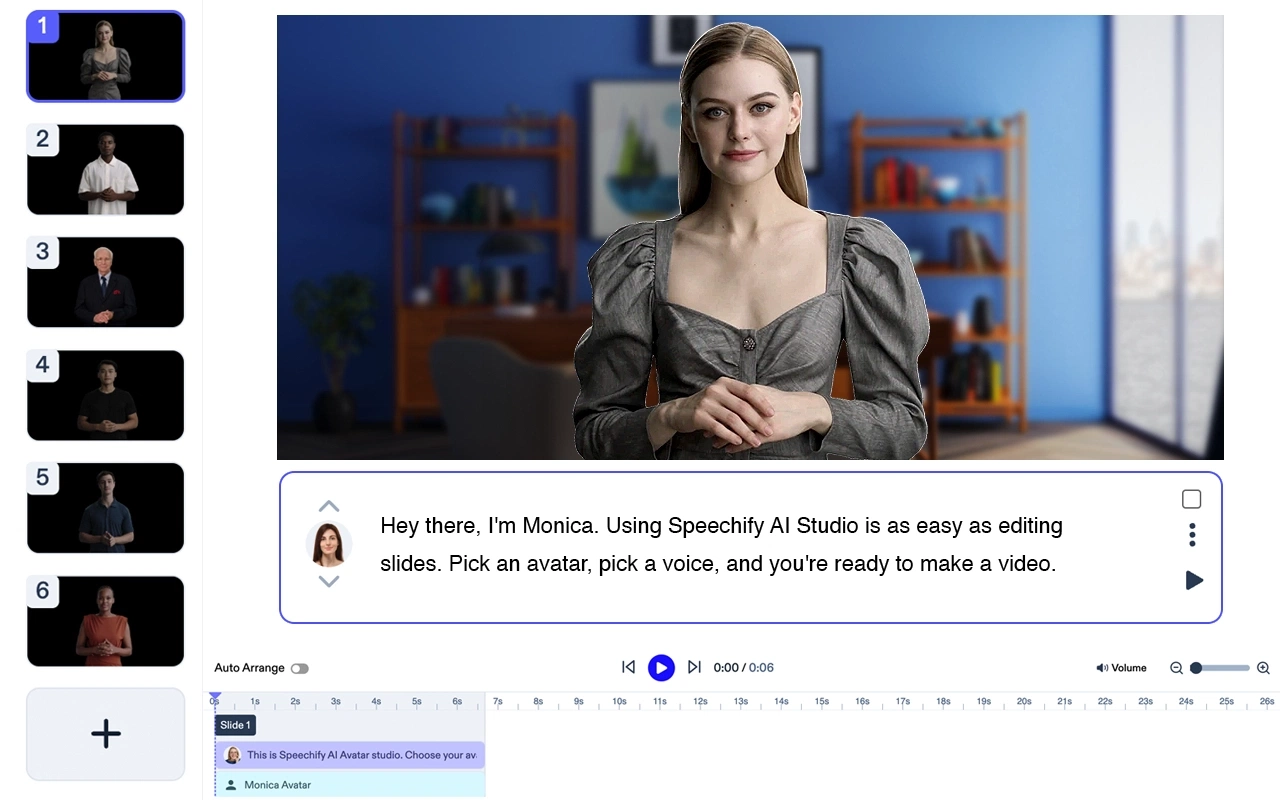
Želite li dodatno unaprijediti video prezentacije, isprobajte Speechify voiceover i dodajte audio svojim PowerPoint slajdovima.
Sa Speechify voiceoverom možete napisati tekst za svaki slajd i preuzeti ga na računalo u MP3 formatu. Birajte brzinu glasa kako bi bila usklađena sa slajdovima.
Isprobajte Speechify voiceover besplatno i podignite svoje prezentacije na višu razinu.
FAQ
Što je PPT u video konverter?
PPT u video konverter je softver koji PowerPoint prezentacije pretvara u video s animacijama, govorom i glazbom.
Koja je glavna svrha ovog softvera?
Pretvaranje PPT datoteka u video olakšava izradu atraktivnih prezentacija spremnih za dijeljenje na društvenim mrežama.
Koje su prednosti i nedostaci pretvaranja PPT-a u video?
Prednost ovog procesa je što prezentacija postaje dinamičnija i lakše privlači pažnju gledatelja. Nedostatak je što svaki slajd ima ograničeno vrijeme i nema prostora za dodatna pojašnjenja.
Trebam li dodati glazbu u prezentaciju?
Glazba može prezentaciju podići na višu razinu i dodatno zainteresirati gledatelje.



