1. Acasă
  2. Speechify for Web
  3. How can I import my files to Speechify on a computer?
Speechify for Web

How can I import my files to Speechify on a computer?

Cliff Weitzman

Cliff Weitzman

CEO/Founder of Speechify

apple logoPremiul Apple Design 2025
Peste 50M de utilizatori

Use the web app to import your files and other content on your PC, laptop or desktop

You can easily access your Speechify library on the web using a PC, desktop or laptop and also add files directly to your Speechify library on the web app.

  1. Go to app.speechify.com, preferably using a Chromium browser.
  2. Sign in using your Speechify credentials.
  3. The home page is your Speechify account library,
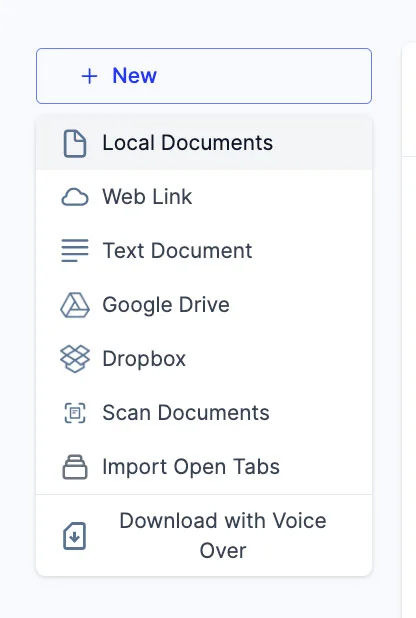
  4. You can add new files to your library by clicking on the '+ New' button on the left side of the screen.
  5. This option allows you to import various files and documents directly into your Speechify library.
    1. Local Documents: Add any PDF files located locally on your computer, PC or desktop.
    2. Web Link: Just copy and paste and web link or URL that you want to add to your library. Please note that password or paywall-protected links might not work.
    3. Text Document: You can copy and directly paste any content into the Speechify library using this option.
    4. Google Drive: Connect your Google Drive to your Speechify library and directly import any documents.
    5. Dropbox: Connect your Dropbox drive to your Speechify library and directly import any documents.
    6. Scan Documents: This option redirects you to the phone app (iOS or Android) so that you can use your phone camera to scan any physical documents directly with the Speechify app.
    7. Import Open Tabs: This option lets you import any open tab in your browser directly into your Speechify library.
    8. Download with Voice Over: Voice over is a separate offering by Speechify that lets you create and download voiceovers and audio files. You can try the Voiceover product for free but the download option is only available with the paid Voiceover subscription, which is not included in the Speechify Text-to-Speech premium plan. This option will redirect you to the Voiceover webpage.

Bucură-te de cele mai avansate voci AI, fișiere nelimitate și suport 24/7

Încearcă gratuit
tts banner for blog

Distribuie acest articol

Cliff Weitzman

Cliff Weitzman

CEO/Founder of Speechify

Cliff Weitzman is a dyslexia advocate and the CEO and founder of Speechify, the #1 text-to-speech app in the world, totaling over 100,000 5-star reviews and ranking first place in the App Store for the News & Magazines category. In 2017, Weitzman was named to the Forbes 30 under 30 list for his work making the internet more accessible to people with learning disabilities. Cliff Weitzman has been featured in EdSurge, Inc., PC Mag, Entrepreneur, Mashable, among other leading outlets.

speechify logo

Despre Speechify

Cititor Text to Speech nr. 1

Speechify este platforma de top la nivel mondial în text to speech, de încredere pentru peste 50 de milioane de utilizatori și apreciată cu peste 500.000 de recenzii de 5 stele pentru aplicațiile sale de iOS, Android, Extensie Chrome, aplicație web și aplicație desktop Mac. În 2025, Apple a recompensat Speechify cu prestigiosul Apple Design Award la WWDC, numindu-l „o resursă esențială care ajută oamenii să trăiască mai bine”. Speechify oferă peste 1.000 de voci naturale în peste 60 de limbi și este folosit în aproape 200 de țări. Voci de celebrități includ Snoop Dogg, Mr. Beast și Gwyneth Paltrow. Pentru creatori și afaceri, Speechify Studio oferă instrumente avansate, inclusiv Generator de Voci AI, Clonare de voce AI, Dublaj AI și Schimbător de voce AI. Speechify alimentează și produse de top cu al său API text to speech de înaltă calitate, eficient din punct de vedere al costurilor. Prezentat în The Wall Street Journal, CNBC, Forbes, TechCrunch și alte publicații importante, Speechify este cel mai mare furnizor de text to speech din lume. Vizitează speechify.com/news, speechify.com/blog și speechify.com/press pentru a afla mai multe.