Bilgisayarınızda, dizüstü bilgisayarınızda veya masaüstü bilgisayarınızda dosyalarınızı ve diğer içerikleri aktarmak için web uygulamasını kullanın
Speechify kitaplığınıza web üzerinden, bir PC, masaüstü veya dizüstü bilgisayar kullanarak kolayca erişebilir ve web uygulamasında kitaplığınıza doğrudan dosya ekleyebilirsiniz.
- Tercihen bir Chromium tabanlı tarayıcı kullanarak app.speechify.com adresine gidin.
- Speechify hesap bilgilerinizle oturum açın.
- Açılan ana sayfa, Speechify hesap kitaplığınızdır.
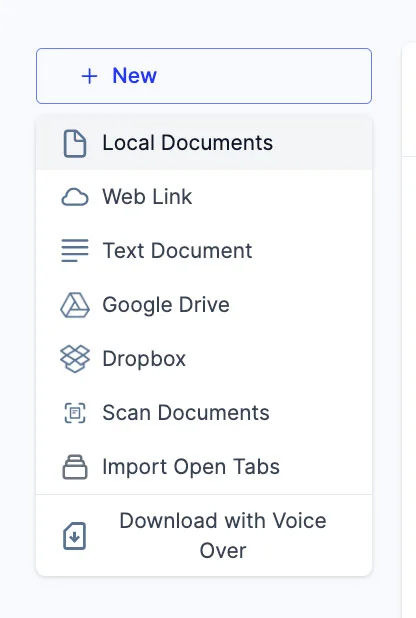
- Ekranın sol tarafındaki '+ Yeni' butonuna tıklayarak kitaplığınıza yeni dosyalar ekleyebilirsiniz.
- Bu seçenekle farklı dosya ve belgeleri doğrudan Speechify kitaplığınıza aktarabilirsiniz.
- Yerel Belgeler: Bilgisayarınızda (PC veya masaüstünüzde) yerel olarak kayıtlı PDF dosyalarını ekleyin.
- Web Bağlantısı: Kitaplığınıza eklemek istediğiniz herhangi bir web bağlantısını veya URL'yi kopyalayıp yapıştırın. Şifre korumalı ya da ödeme duvarlı bağlantıların çalışmayabileceğini unutmayın.
- Metin Belgesi: Bu seçeneği kullanarak dilediğiniz içeriği kopyalayıp doğrudan Speechify kitaplığınıza yapıştırabilirsiniz.
- Google Drive: Google Drive hesabınızı Speechify kitaplığınıza bağlayarak belgeleri doğrudan içe aktarabilirsiniz.
- Dropbox: Dropbox hesabınızı Speechify kitaplığınıza bağlayarak belgeleri doğrudan aktarabilirsiniz.
- Belgeleri Tara: Bu seçenek sizi telefon uygulamasına (iOS veya Android) yönlendirir; böylece telefon kameranızı kullanarak fiziksel belgeleri doğrudan Speechify uygulamasıyla tarayabilirsiniz.
- Açık Sekmeleri İçe Aktar: Bu seçenekle tarayıcınızda açık olan sekmeleri doğrudan Speechify kitaplığınıza ekleyebilirsiniz.
- Şununla indir: Voice Over: Voice Over, Speechify'in ayrı bir ürünü olup seslendirme ve ses dosyaları oluşturup indirmenize olanak tanır. Voiceover ürününü ücretsiz deneyebilirsiniz, ancak indirme seçeneği yalnızca ücretli Voiceover aboneliğiyle kullanılabilir ve bu abonelik Speechify Metinden Sese premium planına dahil değildir. Bu seçenek sizi Voiceover web sayfasına yönlendirir.