
1. হোম
  2. ওয়েবের জন্য স্পিচিফাই
  3. How can I import my files to Speechify on a computer?
প্রকাশের তারিখ ওয়েবের জন্য স্পিচিফাই

How can I import my files to Speechify on a computer?

Cliff Weitzman

ক্লিফ ওয়েইৎজম্যান

Speechify-এর সিইও ও প্রতিষ্ঠাতা

apple logo২০২৫ অ্যাপল ডিজাইন অ্যাওয়ার্ড
৫ কোটি+ ব্যবহারকারী

Use the web app to import your files and other content on your PC, laptop or desktop

You can easily access your Speechify library on the web using a PC, desktop or laptop and also add files directly to your Speechify library on the web app.

  1. Go to app.speechify.com, preferably using a Chromium browser.
  2. Sign in using your Speechify credentials.
  3. The home page is your Speechify account library,
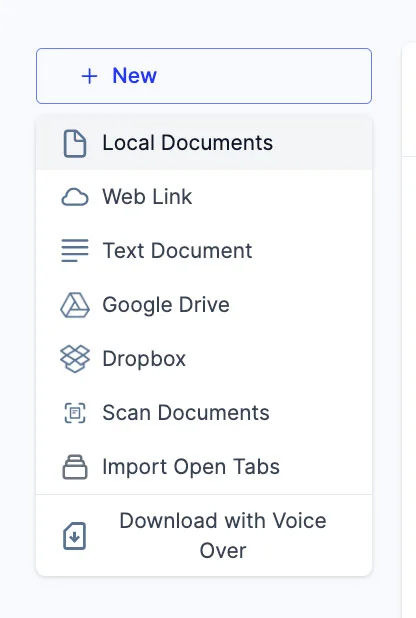
  4. You can add new files to your library by clicking on the '+ New' button on the left side of the screen.
  5. This option allows you to import various files and documents directly into your Speechify library.
    1. Local Documents: Add any PDF files located locally on your computer, PC or desktop.
    2. Web Link: Just copy and paste and web link or URL that you want to add to your library. Please note that password or paywall-protected links might not work.
    3. Text Document: You can copy and directly paste any content into the Speechify library using this option.
    4. Google Drive: Connect your Google Drive to your Speechify library and directly import any documents.
    5. Dropbox: Connect your Dropbox drive to your Speechify library and directly import any documents.
    6. Scan Documents: This option redirects you to the phone app (iOS or Android) so that you can use your phone camera to scan any physical documents directly with the Speechify app.
    7. Import Open Tabs: This option lets you import any open tab in your browser directly into your Speechify library.
    8. Download with Voice Over: Voice over is a separate offering by Speechify that lets you create and download voiceovers and audio files. You can try the Voiceover product for free but the download option is only available with the paid Voiceover subscription, which is not included in the Speechify Text-to-Speech premium plan. This option will redirect you to the Voiceover webpage.

অত্যাধুনিক AI কণ্ঠস্বর, সীমাহীন ফাইল আর ২৪/৭ সহায়তা উপভোগ করুন

বিনামূল্যে ব্যবহার করে দেখুন
tts banner for blog

এই নিবন্ধটি শেয়ার করুন

Cliff Weitzman

ক্লিফ ওয়েইৎজম্যান

Speechify-এর সিইও ও প্রতিষ্ঠাতা

ক্লিফ ওয়েইৎজম্যান ডিসলেক্সিয়ার পক্ষে সোচ্চার এবং Speechify-এর সিইও ও প্রতিষ্ঠাতা। Speechify হলো বিশ্বের #1 টেক্সট-টু-স্পিচ অ্যাপ, যার ১,০০,০০০+ ৫-তারকা রিভিউ এবং অ্যাপ স্টোরে সংবাদ ও ম্যাগাজিন শ্রেণিতে শীর্ষ স্থান। ২০১৭ সালে, ওয়েইৎজম্যান Forbes 30 Under 30-এ ছিলেন, ওয়েব আরও সহজলভ্য করতে তার অবদানের জন্য। ক্লিফ ওয়েইৎজম্যান EdSurge, Inc., PC Mag, Entrepreneur, Mashable-সহ নানা শীর্ষ মিডিয়ায় আলোচিত হয়েছেন।

speechify logo

স্পিচিফাই সম্পর্কে

#১ টেক্সট-টু-স্পিচ রিডার

স্পিচিফাই পৃথিবীর শীর্ষস্থানীয় টেক্সট-টু-স্পিচ প্ল্যাটফর্ম, যা ৫ কোটি+ ব্যবহারকারীর কাছে ভরসাযোগ্য এবং এর টেক্সট-টু-স্পিচ iOS, অ্যান্ড্রয়েড, ক্রোম এক্সটেনশন, ওয়েব অ্যাপ আর ম্যাক ডেস্কটপ অ্যাপসে ৫ লক্ষ+ ফাইভ-স্টার রিভিউ পেয়েছে। ২০২৫ সালে অ্যাপল স্পিচিফাই-কে মর্যাদাপূর্ণ অ্যাপল ডিজাইন অ্যাওয়ার্ড প্রদান করে WWDC-তে এবং একে বলে, “মানুষের জীবনে দারুণ সহায়ক একটি গুরুত্বপূর্ণ রিসোর্স।” স্পিচিফাই ৬০+ ভাষায় ১,০০০+ প্রাকৃতিক কণ্ঠ নিয়ে প্রায় ২০০ দেশে ব্যবহৃত হচ্ছে। সেলিব্রিটি কণ্ঠের মধ্যে রয়েছে স্নুপ ডগ আর গুইনেথ পেল্ট্রো। নির্মাতা ও ব্যবসার জন্য স্পিচিফাই স্টুডিও উন্নত সব টুল দেয়, যার মধ্যে রয়েছে AI ভয়েস জেনারেটর, AI ভয়েস ক্লোনিং, AI ডাবিং আর AI ভয়েস চেঞ্জার। স্পিচিফাই-এর উচ্চমানের এবং খরচ-সাশ্রয়ী টেক্সট-টু-স্পিচ API-এর মাধ্যমে অসংখ্য শীর্ষ পণ্য সম্ভব হয়েছে। দ্য ওয়াল স্ট্রিট জার্নাল, CNBC, Forbes, TechCrunch এবং অন্যান্য বড় সংবাদমাধ্যমে স্পিচিফাই নিয়ে প্রতিবেদন প্রকাশিত হয়েছে; এটি বিশ্বের সর্ববৃহৎ টেক্সট-টু-স্পিচ প্রদানকারী। আরও জানতে ভিজিট করুন speechify.com/news, speechify.com/blog এবং speechify.com/press


