1. Avaleht
  2. Speechify veebis
  3. How can I import my files to Speechify on a computer?
Avaldatud Speechify veebis

How can I import my files to Speechify on a computer?

Cliff Weitzman

Cliff Weitzman

Speechify tegevjuht/asutaja

apple logo2025. aasta Apple'i disainiauhind
50M+ kasutajat

Use the web app to import your files and other content on your PC, laptop or desktop

You can easily access your Speechify library on the web using a PC, desktop or laptop and also add files directly to your Speechify library on the web app.

  1. Go to app.speechify.com, preferably using a Chromium browser.
  2. Sign in using your Speechify credentials.
  3. The home page is your Speechify account library,
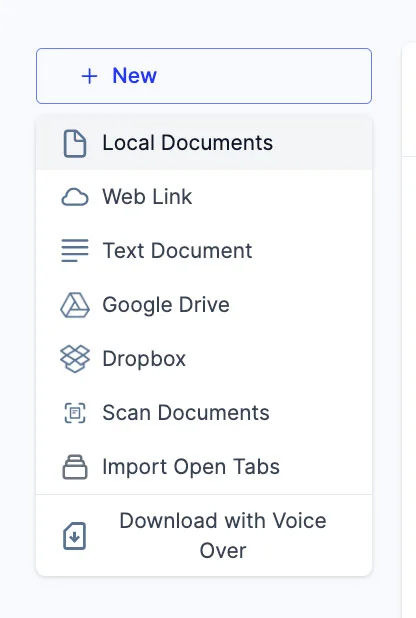
  4. You can add new files to your library by clicking on the '+ New' button on the left side of the screen.
  5. This option allows you to import various files and documents directly into your Speechify library.
    1. Local Documents: Add any PDF files located locally on your computer, PC or desktop.
    2. Web Link: Just copy and paste and web link or URL that you want to add to your library. Please note that password or paywall-protected links might not work.
    3. Text Document: You can copy and directly paste any content into the Speechify library using this option.
    4. Google Drive: Connect your Google Drive to your Speechify library and directly import any documents.
    5. Dropbox: Connect your Dropbox drive to your Speechify library and directly import any documents.
    6. Scan Documents: This option redirects you to the phone app (iOS or Android) so that you can use your phone camera to scan any physical documents directly with the Speechify app.
    7. Import Open Tabs: This option lets you import any open tab in your browser directly into your Speechify library.
    8. Download with Voice Over: Voice over is a separate offering by Speechify that lets you create and download voiceovers and audio files. You can try the Voiceover product for free but the download option is only available with the paid Voiceover subscription, which is not included in the Speechify Text-to-Speech premium plan. This option will redirect you to the Voiceover webpage.

Naudi tipptasemel AI-hääli, piiramatult faile ja ööpäevaringset kliendituge

Proovi tasuta
tts banner for blog

Jaga seda artiklit

Cliff Weitzman

Cliff Weitzman

Speechify tegevjuht/asutaja

Cliff Weitzman on düsleksia eestkõneleja ning Speechify tegevjuht ja asutaja. Speechify on maailma populaarseim kõnesünteesi rakendus, millel on üle 100 000 viietärnilise arvustuse ja mis on App Store'is Uudiste & Ajakirjade kategoorias esikohal. 2017. aastal kanti Weitzman Forbesi „30 alla 30” nimekirja tema töö eest interneti ligipääsetavuse parandamisel õpiraskustega inimestele. Cliff Weitzmanist on kirjutanud ka EdSurge, Inc, PC Mag, Entrepreneur, Mashable ja paljud teised juhtivad väljaanded.

speechify logo

Speechify'st

#1 tekst kõneks rakendus

Speechify on maailma juhtiv tekst kõneks platvorm, mida usaldab üle 50 miljoni kasutaja ja millele on antud enam kui 500 000 viietärnilist arvustust selle tekstist kõneks tehnoloogia eest iOS-, Android-, Chrome Extension-, veebirakendus- ja Mac desktop-rakendustes. 2025. aastal pälvis Speechify Apple’ilt prestiižse Apple’i disainiauhinna WWDC-l, nimetades seda „oluliseks ressursiks, mis aitab inimestel paremini elada.” Speechify pakub üle 1 000 loodusliku kõlaga hääle rohkem kui 60 keeles ning seda kasutatakse ligi 200 riigis. Kuulsuste häältest on saadaval näiteks Snoop Dogg ja Gwyneth Paltrow. Loojatele ja ettevõtetele pakub Speechify Studio täiustatud tööriistu, sh AI-häälegeneraatorit, AI-häälekloonimist, AI-dubleerimist ja AI-häälevahetust. Speechify panustab ka juhtivatesse toodetesse tänu kvaliteetsele ja kuluefektiivsele tekst kõneks API-le. Esindatud näiteks The Wall Street Journal, CNBC, Forbes, TechCrunch ja muudes juhtivates meediakanalites, on Speechify maailma suurim kõnesünteesi teenusepakkuja. Vaata lisaks: speechify.com/news, speechify.com/blog ja speechify.com/press.