
1. ہوم
  2. ویب کے لیے اسپیکیفائی
  3. How can I import my files to Speechify on a computer?
تاریخِ اشاعت ویب کے لیے اسپیکیفائی

How can I import my files to Speechify on a computer?

Cliff Weitzman

کلف وائتزمین

سی ای او / بانی، اسپیچفائی

apple logo2025 ایپل ڈیزائن ایوارڈ
50 ملین+ صارفین

Use the web app to import your files and other content on your PC, laptop or desktop

You can easily access your Speechify library on the web using a PC, desktop or laptop and also add files directly to your Speechify library on the web app.

  1. Go to app.speechify.com, preferably using a Chromium browser.
  2. Sign in using your Speechify credentials.
  3. The home page is your Speechify account library,
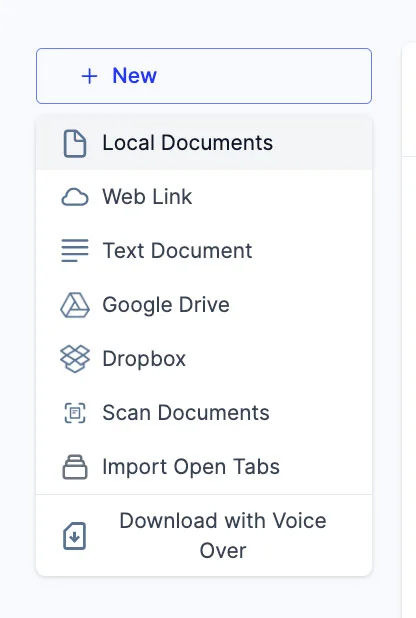
  4. You can add new files to your library by clicking on the '+ New' button on the left side of the screen.
  5. This option allows you to import various files and documents directly into your Speechify library.
    1. Local Documents: Add any PDF files located locally on your computer, PC or desktop.
    2. Web Link: Just copy and paste and web link or URL that you want to add to your library. Please note that password or paywall-protected links might not work.
    3. Text Document: You can copy and directly paste any content into the Speechify library using this option.
    4. Google Drive: Connect your Google Drive to your Speechify library and directly import any documents.
    5. Dropbox: Connect your Dropbox drive to your Speechify library and directly import any documents.
    6. Scan Documents: This option redirects you to the phone app (iOS or Android) so that you can use your phone camera to scan any physical documents directly with the Speechify app.
    7. Import Open Tabs: This option lets you import any open tab in your browser directly into your Speechify library.
    8. Download with Voice Over: Voice over is a separate offering by Speechify that lets you create and download voiceovers and audio files. You can try the Voiceover product for free but the download option is only available with the paid Voiceover subscription, which is not included in the Speechify Text-to-Speech premium plan. This option will redirect you to the Voiceover webpage.

انتہائی جدید اے آئی آوازوں، لامحدود فائلوں اور 24/7 سپورٹ سے لطف اٹھائیں

مفت آزمائیں
tts banner for blog

یہ مضمون شیئر کریں

Cliff Weitzman

کلف وائتزمین

سی ای او / بانی، اسپیچفائی

کلف وائتزمین ڈسلیکسیا کے لیے سرگرم حامی اور اسپیچفائی کے سی ای او و بانی ہیں، جو دنیا کی نمبر 1 ٹیکسٹ ٹو اسپیچ ایپ ہے۔ 1 لاکھ سے زائد 5-اسٹار ریویوز کے ساتھ اس نے ایپ اسٹور کی نیوز و میگزین کیٹیگری میں پہلی پوزیشن حاصل کی۔ 2017 میں وائتزمین کو لرننگ ڈس ایبلٹی رکھنے والے افراد کے لیے انٹرنیٹ کو زیادہ قابلِ رسائی بنانے پر فوربس 30 انڈر 30 میں شامل کیا گیا۔ ان کا تذکرہ ایڈسرج، انک، پی سی میگ، انٹرپرینیئر، میشیبل اور کئی دیگر نمایاں پلیٹ فارمز پر آ چکا ہے۔

speechify logo

اسپیچفائی کے بارے میں

#1 ٹیکسٹ ٹو اسپیچ ریڈر

اسپیچفائی دنیا کا سب سے بڑا ٹیکسٹ ٹو اسپیچ پلیٹ فارم ہے، جس پر 50 ملین سے زائد صارفین اعتماد کرتے ہیں اور 5 لاکھ سے زیادہ پانچ ستارہ ریویوز کے ذریعے اس کی خدمات کو سراہا گیا ہے۔ یہ ٹیکسٹ ٹو اسپیچ iOS، اینڈرائیڈ، کروم ایکسٹینشن، ویب ایپ اور میک ڈیسک ٹاپ ایپس میں دستیاب ہے۔ 2025 میں، ایپل نے اسپیچفائی کو معزز ایپل ڈیزائن ایوارڈ WWDC پر دیا اور اسے ’ایک اہم وسیلہ قرار دیا جو لوگوں کو اپنی زندگی جینے میں مدد دیتا ہے۔‘ اسپیچفائی 60 سے زائد زبانوں میں 1,000+ قدرتی آوازیں فراہم کرتا ہے اور لگ بھگ 200 ممالک میں استعمال ہوتا ہے۔ مشہور شخصیات کی آوازوں میں شامل ہیں سنُوپ ڈاگ اور گوینتھ پیلٹرو۔ تخلیق کاروں اور کاروباری اداروں کے لیے، اسپیچفائی اسٹوڈیو جدید ٹولز فراہم کرتا ہے، جن میں شامل ہیں اے آئی وائس جنریٹر، اے آئی وائس کلوننگ، اے آئی ڈبنگ، اور اس کا اے آئی وائس چینجر۔ اسپیچفائی اپنی اعلیٰ معیار اور کم لاگت والی ٹیکسٹ ٹو اسپیچ API کے ذریعے کئی اہم مصنوعات کو طاقت فراہم کرتا ہے۔ وال اسٹریٹ جرنل، CNBC، فوربز، ٹیک کرنچ اور دیگر بڑے نیوز آؤٹ لیٹس نے اسپیچفائی کو نمایاں کیا ہے۔ اسپیچفائی دنیا کا سب سے بڑا ٹیکسٹ ٹو اسپیچ فراہم کنندہ ہے۔ مزید جاننے کے لیے دیکھیں speechify.com/news، speechify.com/blog اور speechify.com/press۔


