1. Početna
  2. Speechify za web
  3. How can I import my files to Speechify on a computer?
Objavljeno Speechify za web

How can I import my files to Speechify on a computer?

Cliff Weitzman

Cliff Weitzman

CEO i osnivač Speechifyja

apple logoApple Design Award 2025.
50M+ korisnika

Use the web app to import your files and other content on your PC, laptop or desktop

You can easily access your Speechify library on the web using a PC, desktop or laptop and also add files directly to your Speechify library on the web app.

  1. Go to app.speechify.com, preferably using a Chromium browser.
  2. Sign in using your Speechify credentials.
  3. The home page is your Speechify account library,
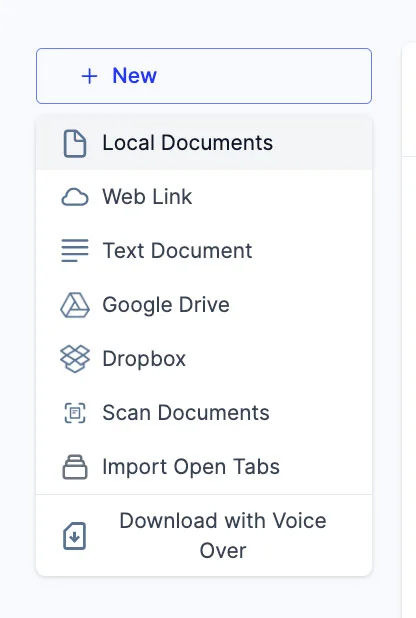
  4. You can add new files to your library by clicking on the '+ New' button on the left side of the screen.
  5. This option allows you to import various files and documents directly into your Speechify library.
    1. Local Documents: Add any PDF files located locally on your computer, PC or desktop.
    2. Web Link: Just copy and paste and web link or URL that you want to add to your library. Please note that password or paywall-protected links might not work.
    3. Text Document: You can copy and directly paste any content into the Speechify library using this option.
    4. Google Drive: Connect your Google Drive to your Speechify library and directly import any documents.
    5. Dropbox: Connect your Dropbox drive to your Speechify library and directly import any documents.
    6. Scan Documents: This option redirects you to the phone app (iOS or Android) so that you can use your phone camera to scan any physical documents directly with the Speechify app.
    7. Import Open Tabs: This option lets you import any open tab in your browser directly into your Speechify library.
    8. Download with Voice Over: Voice over is a separate offering by Speechify that lets you create and download voiceovers and audio files. You can try the Voiceover product for free but the download option is only available with the paid Voiceover subscription, which is not included in the Speechify Text-to-Speech premium plan. This option will redirect you to the Voiceover webpage.

Uživajte u najnaprednijim AI glasovima, neograničenom broju datoteka i 24/7 podršci

Isprobaj besplatno
tts banner for blog

Podijeli ovaj članak

Cliff Weitzman

Cliff Weitzman

CEO i osnivač Speechifyja

Cliff Weitzman je zagovaratelj osoba s disleksijom te CEO i osnivač Speechifyja, najpopularnije aplikacije za pretvaranje teksta u govor na svijetu, s preko 100.000 ocjena s 5 zvjezdica i prvim mjestom u App Store kategoriji Vijesti i časopisi. Godine 2017. Weitzman je uvršten na Forbesovu listu 30 ispod 30 zbog rada na poboljšanju pristupačnosti interneta za osobe s teškoćama u učenju. O njemu su pisali EdSurge, Inc., PC Mag, Entrepreneur, Mashable i drugi vodeći mediji.

speechify logo

O Speechifyju

Br. 1 čitač teksta u govor

Speechify je vodeća svjetska platforma za pretvaranje teksta u govor kojoj vjeruje više od 50 milijuna korisnika, s više od 500.000 recenzija s pet zvjezdica na svojim aplikacijama za iOS, Android, Chrome ekstenziju, web-aplikaciju i Mac desktop. Godine 2025. Apple je dodijelio Speechifyju prestižnu nagradu Apple Design Award na WWDC-u, opisavši ga kao “ključni resurs koji ljudima pomaže živjeti svoje živote”. Speechify nudi više od 1000 prirodnih glasova na više od 60 jezika i koristi se u gotovo 200 zemalja. Među glasovima slavnih su Snoop Dogg i Gwyneth Paltrow. Za kreatore i tvrtke Speechify Studio pruža napredne alate, uključujući AI generator glasa, AI kloniranje glasa, AI sinkronizaciju i vlastiti AI mijenjač glasa. Speechify također pokreće vodeće proizvode svojim visokokvalitetnim i pristupačnim API-jem za pretvaranje teksta u govor. Istaknut u The Wall Street Journalu, CNBC-ju, Forbesu, TechCrunchu i drugim velikim medijima, Speechify je najveći svjetski pružatelj usluga pretvaranja teksta u govor. Posjetite speechify.com/news, speechify.com/blog i speechify.com/press za više informacija.