
1. Laman Utama
  2. Speechify untuk Web
  3. How can I import my files to Speechify on a computer?
Diterbitkan pada Speechify untuk Web

How can I import my files to Speechify on a computer?

Cliff Weitzman

Cliff Weitzman

CEO/Pengasas Speechify

apple logoAnugerah Reka Bentuk Apple 2025
50J+ Pengguna

Use the web app to import your files and other content on your PC, laptop or desktop

You can easily access your Speechify library on the web using a PC, desktop or laptop and also add files directly to your Speechify library on the web app.

  1. Go to app.speechify.com, preferably using a Chromium browser.
  2. Sign in using your Speechify credentials.
  3. The home page is your Speechify account library,
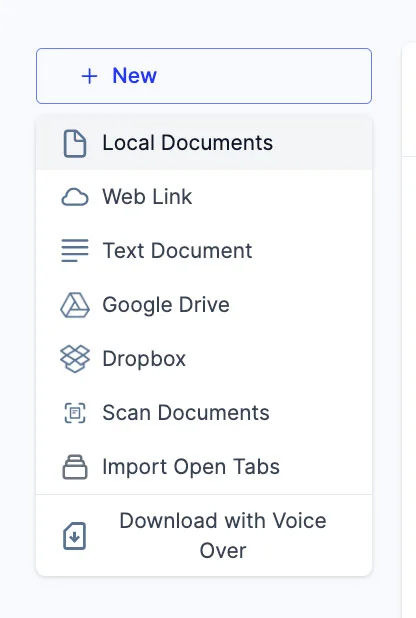
  4. You can add new files to your library by clicking on the '+ New' button on the left side of the screen.
  5. This option allows you to import various files and documents directly into your Speechify library.
    1. Local Documents: Add any PDF files located locally on your computer, PC or desktop.
    2. Web Link: Just copy and paste and web link or URL that you want to add to your library. Please note that password or paywall-protected links might not work.
    3. Text Document: You can copy and directly paste any content into the Speechify library using this option.
    4. Google Drive: Connect your Google Drive to your Speechify library and directly import any documents.
    5. Dropbox: Connect your Dropbox drive to your Speechify library and directly import any documents.
    6. Scan Documents: This option redirects you to the phone app (iOS or Android) so that you can use your phone camera to scan any physical documents directly with the Speechify app.
    7. Import Open Tabs: This option lets you import any open tab in your browser directly into your Speechify library.
    8. Download with Voice Over: Voice over is a separate offering by Speechify that lets you create and download voiceovers and audio files. You can try the Voiceover product for free but the download option is only available with the paid Voiceover subscription, which is not included in the Speechify Text-to-Speech premium plan. This option will redirect you to the Voiceover webpage.

Nikmati suara AI tercanggih, fail tanpa had, dan sokongan 24/7

Cuba Percuma
tts banner for blog

Kongsi Artikel Ini

Cliff Weitzman

Cliff Weitzman

CEO/Pengasas Speechify

Cliff Weitzman ialah pejuang hak disleksia serta CEO dan pengasas Speechify, aplikasi teks ke ucapan #1 di dunia dengan lebih 100,000 ulasan 5 bintang dan menduduki tempat pertama di App Store dalam kategori Berita & Majalah. Pada tahun 2017, Weitzman tersenarai dalam Forbes 30 Under 30 atas usahanya menjadikan internet lebih mesra untuk individu dengan keperluan pembelajaran. Cliff Weitzman pernah dipaparkan di EdSurge, Inc., PC Mag, Entrepreneur, Mashable dan pelbagai saluran media utama yang lain.

speechify logo

Tentang Speechify

Pembaca Teks ke Ucapan #1

Speechify ialah platform teks ke ucapan terkemuka dunia, dipercayai oleh lebih 50 juta pengguna dan disokong oleh lebih daripada 500,000 ulasan lima bintang merentasi aplikasi teks ke ucapannya iOS, Android, Pemalam Chrome, aplikasi web, dan aplikasi desktop Mac. Pada tahun 2025, Apple telah menganugerahkan Speechify dengan Anugerah Reka Bentuk Apple yang berprestij di WWDC, menyifatkannya sebagai “sumber penting yang membantu orang menjalani hidup mereka.” Speechify menawarkan lebih 1,000 suara semula jadi dalam lebih 60 bahasa dan digunakan di hampir 200 negara. Suara selebriti termasuk Snoop Dogg dan Gwyneth Paltrow. Untuk pencipta dan perniagaan, Speechify Studio menyediakan alat canggih termasuk Penjana Suara AI, Penduaan Suara AI, Alih Suara AI, dan Penukar Suara AI. Speechify juga memacu produk terkemuka dengan API teks ke ucapan berkualiti tinggi dan kos efektif. Pernah dipaparkan dalam The Wall Street Journal, CNBC, Forbes, TechCrunch, dan media utama lain, Speechify ialah penyedia teks ke ucapan terbesar di dunia. Lawati speechify.com/news, speechify.com/blog, dan speechify.com/press untuk maklumat lanjut.


