How to skip content such as headers, footers, brackets, etc. on the computer?

Cliff Weitzman
CEO/Founder of Speechify
Speechify, Your Voice AI Assistant
Text to Speech. Voice Typing. Fast Answers.
 2025 Apple Design Award
50M+ Users
You can skip content such as headers, footers, brackets, braces, citations, etc. on the web app on your PC, desktop or laptop
- Sign in to app.speechify.com using your Speechify account credentials, preferably using a Chromium browser.
- Open the file that you want to listen to.
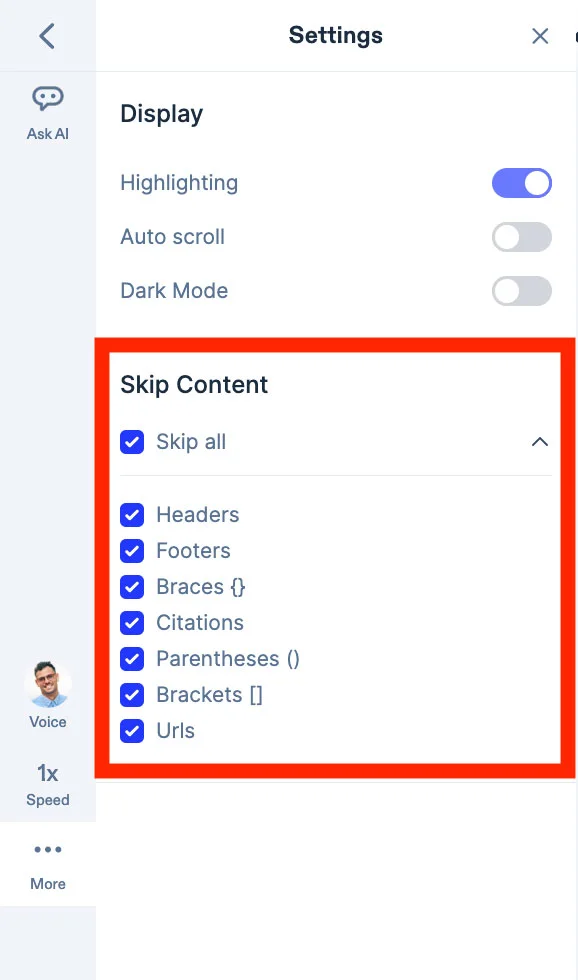
- Click on 'More' on the left side toolbar and click on the check boxes next to the content that you would like to skip. You can skip content such as headers, footers, brackets, braces, citations, parentheses and URLs within the document.
- You can also click on 'Skip All' to skip all categories of content as per the list.
- This feature will let the web app skip the content in your document, as per your preference.
Enjoy the most advanced AI voices, unlimited files, and 24/7 support
Try For Free