
1. Inici
  2. Speechify per al web
  3. How can I import my files to Speechify on a computer?
Publicat el Speechify per al web

How can I import my files to Speechify on a computer?

Cliff Weitzman

Cliff Weitzman

CEO i fundador de Speechify

apple logoPremi de Disseny Apple 2025
Més de 50 M d'usuaris

Use the web app to import your files and other content on your PC, laptop or desktop

You can easily access your Speechify library on the web using a PC, desktop or laptop and also add files directly to your Speechify library on the web app.

  1. Go to app.speechify.com, preferably using a Chromium browser.
  2. Sign in using your Speechify credentials.
  3. The home page is your Speechify account library,
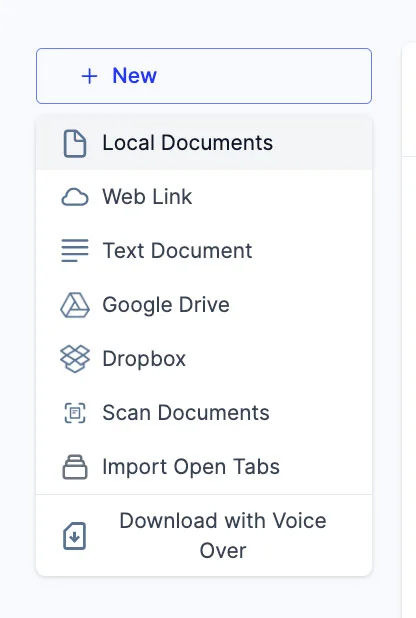
  4. You can add new files to your library by clicking on the '+ New' button on the left side of the screen.
  5. This option allows you to import various files and documents directly into your Speechify library.
    1. Local Documents: Add any PDF files located locally on your computer, PC or desktop.
    2. Web Link: Just copy and paste and web link or URL that you want to add to your library. Please note that password or paywall-protected links might not work.
    3. Text Document: You can copy and directly paste any content into the Speechify library using this option.
    4. Google Drive: Connect your Google Drive to your Speechify library and directly import any documents.
    5. Dropbox: Connect your Dropbox drive to your Speechify library and directly import any documents.
    6. Scan Documents: This option redirects you to the phone app (iOS or Android) so that you can use your phone camera to scan any physical documents directly with the Speechify app.
    7. Import Open Tabs: This option lets you import any open tab in your browser directly into your Speechify library.
    8. Download with Voice Over: Voice over is a separate offering by Speechify that lets you create and download voiceovers and audio files. You can try the Voiceover product for free but the download option is only available with the paid Voiceover subscription, which is not included in the Speechify Text-to-Speech premium plan. This option will redirect you to the Voiceover webpage.

Gaudeix de les veus amb IA més avançades, arxius il·limitats i suport 24/7

Prova-ho gratis
tts banner for blog

Comparteix aquest article

Cliff Weitzman

Cliff Weitzman

CEO i fundador de Speechify

Cliff Weitzman és un defensor de la dislèxia i el CEO i fundador de Speechify, l'app de text a veu número 1 al món, amb més de 100.000 ressenyes de 5 estrelles i líder del rànquing de l'App Store en Notícies i Revistes. El 2017, Weitzman va entrar a la llista Forbes 30 under 30 per la seva tasca fent internet més accessible per a persones amb dificultats d'aprenentatge. Cliff Weitzman ha aparegut a EdSurge, Inc., PC Mag, Entrepreneur, Mashable i altres mitjans destacats.

speechify logo

Sobre Speechify

El millor lector de text a veu

Speechify és la plataforma líder mundial de text a veu, de confiança per a més de 50 milions d'usuaris i avalada per més de 500.000 ressenyes de cinc estrelles a les seves aplicacions de text a veu per a iOS, Android, Extensió de Chrome, aplicació web i aplicació per a Mac. El 2025, Apple va premiar Speechify amb el prestigiós Premi de Disseny Apple a la WWDC, qualificant-lo com “una eina essencial que ajuda la gent a viure la seva vida.” Speechify ofereix més de 1.000 veus naturals en més de 60 idiomes i s'utilitza a gairebé 200 països. Entre les veus de celebritats hi trobem Snoop Dogg i Gwyneth Paltrow. Per a creadors i empreses, Speechify Studio proporciona eines avançades com Generador de veu IA, Clonació de veus IA, Doblatge IA i el seu Canviador de veu IA. Speechify també impulsa productes líders amb la seva API de text a veu, d'alta qualitat i amb una relació qualitat-preu òptima API de text a veu. Present en The Wall Street Journal, CNBC, Forbes, TechCrunch i altres mitjans destacats, Speechify és el proveïdor de text a veu més gran del món. Visiteu speechify.com/news, speechify.com/blog i speechify.com/press per saber-ne més.


