#1 Text to Speech Reader.
Let Speechify Read To You.

apple logo2025 Apple Design Award
500k+ 5-star reviews
chrome logo whiteChrome Extension of The Year
50M+ Users
Official Speechify partnership

Try Speechify Text to Speech Free Today

Generate text in

I first heard about Speechify from my husband, who uses Speechify for all of his reading.

I love using Speechify while driving, cooking, and going for a walk. I use it to listen to scripts for work and books for fun.

I showed Speechify to all my girlfriends, and now they use it too.

Gwyneth
Gwyneth
Actress
Cliff
Cliff
Speechify Founder
Geffen
Geffen
Velvet Narrator
John
John
Actor
Snoop
Snoop
Music Icon
Ali Abdaal
Ali Abdaal
YouTuber
Dominic
Dominic
Storyteller
Voices1000+
Sign In
to explore

200+ Human Voices

Enjoy over 200 lifelike AI text to speech voices across 60+ languages or clone your voice.

Read 4.5x Faster

Our TTS users save up to 9hrs a week by using Speechify to speed read aloud.

Instant AI Summaries

Speechify AI reader can instantly summarize every reading so you get the takeaways right away.

Scan & Listen.

Use the app to snap a pic of any page and have Speechify's text reader read to you

OUR LISTENERS LOVE US

Over 500k people have given Speechify 5 stars

  • Richard Branson

    Speechify is absolutely brilliant. Growing up with dyslexia this would have made a big difference. I’m so glad to have it today.

    Sir Richard Branson, Business Magnate
  • gwyneth paltrow

    Speechify makes it easy to learn at 2x or even 3x the speed you read with your eyes.

    Gwyneth Paltrow, Actress and Businesswoman
  • Ali Abdaal

    If there’s one hill I’m going to die on, it’s that speed listening is the best way forward. Speechify is a game-changer for me.

    Ali Abdaal, most followed Productivity Expert in the world.
Cliff
Hi, I'm Cliff Weitzman, founder of Speechify.
I am dyslexic.Growing up, my dad would read Harry Potter to me because I couldn't do it myself. He was my hero.But without reading, I couldn't become the person I wanted to be.So, I taught myself to code and built Speechify to be my text to speech platform.Together with over 200 amazing people at Speechify, we've become the largest provider of AI speech in the world.Today, over 55 million people can achieve their full potential in school and society because Speechify lets them read faster, read more, and remember more.Thank you for using Speechify!
Signature

Introducing Studio

Introducing Speechify Studio, a new suite of tools for creators and businesses to create voice overs, clones, and dubs for social media videos, ads, corporate training, podcasts, and any other voice needs. Choose from 1,000+ voices, 100+ languages & accents, 13+ emotions, and much more.

Try For Free
Henry
Henry
Ads, E-Learning
Kristy
Kristy
Website, Youtube
Carly
Carly
TikTok, Podcasts
Russell
Russell
Audiobooks, Documentary

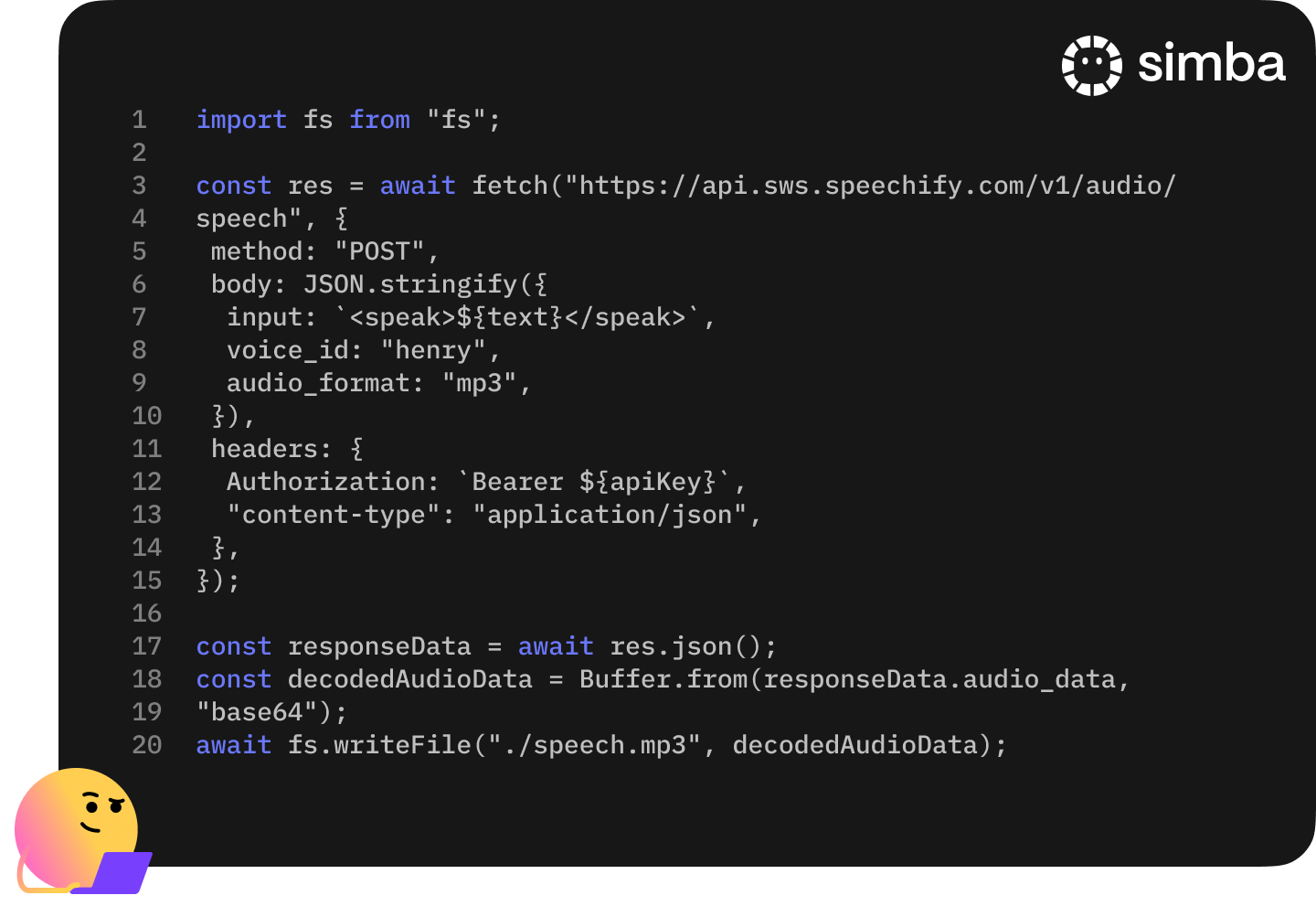
Introducing Our Text To Speech API

We're sharing an AI Voice API that delivers Speechify's most natural and beloved AI voices directly with developers

simba ai

FAQ

Speechify is an all-in-one Voice AI Productivity Assistant that lets users research topics and get answers through voice conversations, read with text to speech, voice type, take AI notes, and create AI podcasts in one platform via voice commands and conversational dialogue.

Try Speechify For Free

Speechify is a Voice AI Productivity Assistant, combining voice-activated conversations, research, question answering, text to speech, voice typing, an AI note taker, and AI podcast creation across apps, while ChatGPT, Gemini, Grok, and Perplexity are primarily text-based chat tools.

Try Speechify For Free

Speechify is a Voice AI Productivity Assistant that supports conversations, understands long-form content, reads information aloud, enables voice typing and AI note-taking, and helps users research, write, and create AI podcasts all with voice, rather than just responding to commands like Siri and Alexa.

Try Speechify For Free

Yes. Speechify can replace multiple AI Assistants by acting as the ultimate Voice AI Assistant for listening, dictating, taking AI notes, researching, summarizing, and creating AI podcasts through natural conversation.

Try Speechify For Free

Text to speech, sometimes called TTS, read aloud, or speech synthesis, is the term for using AI voices to turn any input text into speech.

Try Speechify For Free

An AI voice refers to the synthesized or generated speech produced by artificial intelligence systems, enabling machines to communicate with human-like speech.

Try Speechify For Free

You can try Speechify text to speech free via its iOS or Android mobile apps, its web app on Windows or Mac, or its extensions for Chrome and Microsoft Edge

Try Speechify For Free

Speechify AI reader is for everyone, including seniors, students, professionals, and anyone who benefits from listening to written content read aloud.

Try Speechify For Free

Yes. Speechify’s text to speech reader has the most natural, human-sounding voice overs available on the market. The AI voices are now indistinguishable from human voices and available in several different languages including Spanish, Portuguese, German, French, and more.

Try Speechify For Free

Voice cloning allows you to upload or record a few seconds of any speaker, with the speaker’s permission, and generate a clone of the voice. This allows you to listen to any email, PDF, or website in the new cloned voice.

Try Speechify For Free

Yes, please create an account to get started with Speechify's Text to Speech API. You can also review our extensive documentation. This is the same API that currently powers all of our products, providing the highest quality AI text to speech voices on the market to tens of millions of users. This API includes instant voice cloning, language support, streaming, SSML and emotional controllability, speech marks, and much more.

Try Speechify For Free

Yes! If you would like to purchase text to speech plans in bulk, please contact our sales team for schools or teams. We work with large school districts and governments around the world to provide students with access to Speechify at scale. Speechify helps make education more accessible and improves student outcomes.

Try Speechify For Free

Speechify offers over 1,000 natural-sounding text to speech voices in more than 60 languages, so you can listen to articles, PDFs, and documents in a voice and accent that fit your preference.

Try Speechify For Free

People use Speechify for reading documents, studying, listening to articles, proofreading, writing, and improving accessibility. It’s popular among students, professionals, and anyone who wants to absorb information on the go.

Try Speechify For Free

Yes, Speechify Premium users can listen offline by downloading their converted audio, making it easy to access content anytime, even without an internet connection.

Try Speechify For Free

Speechify works seamlessly across computers, tablets, and smartphones—you can access it through the Web app, iOS and Android apps, or the native Mac app for flexible listening anywhere.

Try Speechify For Free

Yes, Speechify works across iOS, Android, Chrome, and desktop, so you can seamlessly switch between devices and keep listening wherever you go.

Try Speechify For Free

Speechify supports around 60+ different languages, including a wide range of regional accents and dialect variations, so users can turn text into speech in a voice style that feels personalized.

Try Speechify For Free

To upload content, simply select “New” on the Speechify Web App, tap “Upload” on the iOS or Android app, or click “Add Files” on the Mac app to import your documents.

Try Speechify For Free

Speechify supports a wide range of file types, including PDF, EPUB, DOCX, XLSX, and TXT, as well as web links, scanned pages, and typed or pasted text, so you can listen to virtually any kind of content.

Try Speechify For Free

Millions of people use Speechify, including students, professionals, educators, and individuals with reading challenges like dyslexia, to make reading easier, faster, and more enjoyable.

Try Speechify For Free

Speechify offers a variety of natural-sounding accents across its 60+ supported languages, including popular English accents and native pronunciations for Spanish, French, German, Italian, and more.

Try Speechify For Free

Speechify is available via its iOS, Android, Mac, Windows, and Web apps, or Speechify Chrome Extension

Try Speechify For Free

Yes, Speechify provides a free trial of its premium plan, allowing you to explore advanced voices, faster playback, and additional features such as dictation before upgrading.

Try Speechify For Free

Speechify Voice Typing is an AI voice dictation tool that turns your spoken words into clean, polished text with automatic grammar correction and filler-word removal.

Try Speechify For Free

Yes, Speechify includes a built-in dictation feature that lets you write hands-free anywhere you type through speech to text and speech recognition technology.

Try Speechify For Free

Voice typing is used for writing emails, taking notes, drafting documents, multitasking, boosting accessibility, and speeding up everyday writing tasks.

Try Speechify For Free

Yes, Speechify includes a Voice AI assistant that can answer questions, summarize pages, explain content, and help you work faster.

Try Speechify For Free

Speechify Voice AI assistant is an interactive tool that lets you talk to any webpage and get instant summaries, explanations, and key points while also supporting text to speech and voice typing.

Try Speechify For Free

Speechify dictation helps students by allowing them to complete assignments faster, reduce typing fatigue, and turn spoken ideas into organized written work via speech to text.

Try Speechify For Free

No, you don’t have to speak perfectly with Speechify Voice Typing because the AI dictation feature is designed to understand natural speech through speech recognition and automatically fix grammar, punctuation, and filler words.

Try Speechify For Free

Yes, Speechify offers free, fast, and accurate AI dictation and speech to text through its Voice Typing feature, letting you speak your text instead of typing.

Try Speechify For Free

Yes, Speechify's AI dictation feature called Voice Typing is available on Speechify's free plan.

Try Speechify For Free

Yes, Speechify can scan text using OCR (Optical Character Recognition) technology, allowing it to read and convert physical text from books, documents, and images into audio.

Try Speechify For Free